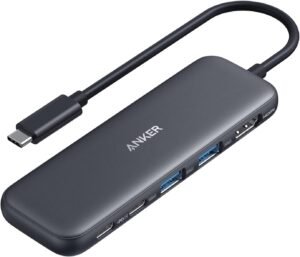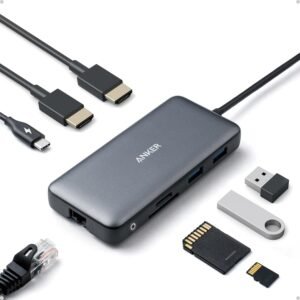
I position the Anker Laptop Docking Station Dual Monitor 8-in-1 USB-C Hub as a compact desk hub that turns one USB-C port into dual HDMI display output, 1 Gbps Ethernet, SD/microSD access, and USB-A connectivity. I see it fitting a practical XPS-style workstation well. Real-world results still depend on matching the laptop and OS to its video limits (4K@60Hz on one HDMI or 4K@30Hz on two). I also plan for power pass-through up to 85W by pairing it with a separate 100W PD charger and a capable USB-C cable.
Key takeaways
- 8-in-1 port mix: dual HDMI, 1 Gbps Ethernet, USB-C PD-in, 2× USB-A data, SD/microSD card readers
- Display expectations: I can run a single HDMI up to 4K@60Hz, or dual HDMI up to 4K@30Hz for productivity-first setups
- macOS behavior: macOS usually mirrors on dual external screens instead of extending, so I may lose a true two-monitor desktop layout
- Charging plan: Up to 85W pass-through charging, though the charger isn’t included; I recommend a 100W PD charger to hit the top end
- Compatibility: Best results require USB-C/USB4/Thunderbolt with DisplayPort Alt Mode + Power Delivery (Windows/ChromeOS tend to work best; Linux isn’t supported)

- The Anker Advantage: Join the 50 million+ powered by our leading technology.
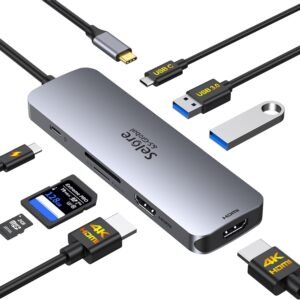
- Massive Expansion: Equipped with a USB C PD-IN charging port, 2 USB-A data ports, 2 HDMI ports, an Ethernet port, and a microSD/SD card reader, giving you an incredible range of functions—all from a single USB-C port.
- Dual HDMI Display: Stream or mirror content to a single device in stunning 4K@60Hz, or hook up two displays to both HDMI ports in 4K@30Hz. Note: For macOS, the display on both external monitors will be identical.
- Power Delivery Compatible: Compatible with USB-C Power Delivery to provide high-speed pass-through charging up to 85W. Please note: 100W PD wall charger and USB-C to C cable required.
- Compatibility: Supports USB-C, USB4, and Thunderbolt connections. Compatible with Windows 10 and 11, ChromeOS, and laptops equipped with DP Alt Mode and Power Delivery. Note: This device is not compatible with Linux.
Overview: A Practical 8-in-1 Desk Hub
I use this 8-in-1 USB-C hub as a simple way to turn one laptop port into a full desk setup. It covers the essentials: USB-C PD-IN for pass-through charging, two USB-A data ports for peripherals, dual HDMI for external displays, 1 Gbps Ethernet for a stable wired network, plus microSD/SD for quick file transfers. The compact aluminum body (4.65" x 2.01" x 0.69") and light 0.2 lb weight make it easy to toss in a bag without thinking about it.
What I like for everyday work
Here’s what I focus on when I recommend it:
- Value positioning versus pricier name-brand docks, without sacrificing key ports
- Real buyer feedback: 4.3 out of 5 stars from 6,314 reviews
- Pairs well with travel gear; I often plan it alongside power bank fine print
Check current pricing and availability at Amazon here!
Anker Laptop Docking Station Dual Monitor, 8-in-1 USB C Hub, 4K Dual Monitor with 2 HDMI, 1 Gbps Ethernet Hub, 85W Power Delivery, SD Card Reader, for XPS and More (Charger not Included)
 This image is property of Amazon.com.
Dual HDMI Display Performance (Know the Limits)
This dock’s video output looks great on paper, and it can deliver a crisp desktop setup if I match it to my laptop and workflow. In practice, the display experience hinges on OS support and what “dual monitors” means for my machine.
What I can expect in real use
Here’s how I plan a setup so expectations match reality:
- Single HDMI use: I can run one external display up to 4K@60Hz through HDMI. This is the best choice for sharp text and smooth motion.
- Dual HDMI use: If I connect both HDMI ports, I can run two external displays up to 4K@30Hz. That’s fine for productivity, but I don’t count on it for high-frame-rate work.
- macOS limitation: On many Macs, the two external screens show the same image (mirrored) instead of extended desktops. That breaks true dual-monitor multitasking on a Mac.
- Why reviews conflict: Some buyers love having two HDMI ports, while others say it “doesn’t support dual monitors.” I’ve found that’s usually an OS/device limit or an expectation gap, not a faulty dock.
If I’m still optimizing my power setup alongside displays, I reference power bank fine print to avoid wattage surprises.
Check current pricing and availability at Amazon here!
Anker Laptop Docking Station Dual Monitor, 8-in-1 USB C Hub, 4K Dual Monitor with 2 HDMI, 1 Gbps Ethernet Hub, 85W Power Delivery, SD Card Reader, for XPS and More (Charger not Included)
 This image is property of Amazon.com.
Charging and Connectivity (Strong for Many, Mixed for Some)
Pass-through charging reaches up to 85W over USB-C Power Delivery, which covers most ultrabooks and many 14–16 inch laptops during normal work. I still plan for the full power stack: I need a 100W PD wall charger and a USB-C to C cable to reliably hit that ceiling, and the charger doesn’t come in the box. If I’m already shopping for power gear, I’ll also skim how to read the fine print so I don’t end up with the wrong wattage.
Ethernet tops out at 1Gbps, which is exactly what I want for steady video calls, large uploads, and remote desktop sessions. Wired networking also keeps performance consistent when Wi‑Fi gets crowded.
What I do to avoid the “mixed results” reports
I’ve seen reliability split by laptop model and setup, so I stick to a few habits:
- I match the charger to the dock’s needs: 100W PD if I expect 85W pass-through.
- I use a known-good USB‑C cable rated for high wattage and data, not a random charge-only lead.
- I update laptop USB‑C/Thunderbolt drivers and firmware before blaming HDMI or charging.
- I test each display port option (HDMI vs alternate outputs) and keep resolutions modest if a system acts picky.
Check current pricing and availability at Amazon here!
Anker Laptop Docking Station Dual Monitor, 8-in-1 USB C Hub, 4K Dual Monitor with 2 HDMI, 1 Gbps Ethernet Hub, 85W Power Delivery, SD Card Reader, for XPS and More (Charger not Included)
 This image is property of Amazon.com.
Compatibility Notes to Check Before Buying
I look for a USB-C, USB4, or Thunderbolt port that supports DisplayPort Alt Mode plus USB Power Delivery. Without both, I won’t get video out or laptop charging. I treat Windows 10/11 and ChromeOS as safe bets, then plan cabling and power needs accordingly; I cross-check essentials like wattage with a quick read on power bank fine print. Linux isn’t supported, so I skip it for that setup. macOS works, but I expect mirrored dual displays due to OS behavior, so I don’t flag that as a dock issue.
My quick pre-buy checklist
I confirm these items before I order:
- DP Alt Mode + Power Delivery on the USB-C port
- Windows 10/11 or ChromeOS (avoid Linux)
- macOS external displays will mirror on dual outputs
Check current pricing and availability at Amazon here!
Anker Laptop Docking Station Dual Monitor, 8-in-1 USB C Hub, 4K Dual Monitor with 2 HDMI, 1 Gbps Ethernet Hub, 85W Power Delivery, SD Card Reader, for XPS and More (Charger not Included)
 This image is property of Amazon.com.
Disclosure: As an Amazon Associate, I earn from qualifying purchases.

From San Jose, California. Former IT support lead who has seen unspeakable things plugged into USB ports. Reviews electronics with zero patience for bad firmware.