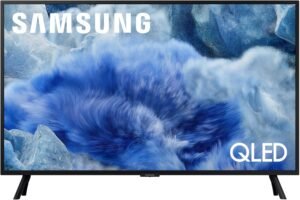
Samsung’s 32-inch QLED Q8F (2025) aims to make a compact screen feel genuinely premium at close range, leaning on a sharp 4K UHD panel, Quantum Dot “100% Color Volume,” and Quantum HDR for richer color and cleaner detail in real-room lighting.
Key takeaways
- 4K UHD in a 32-inch size delivers noticeably crisp text, UI elements, and fine detail at desk distance.
- Quantum Dot color and Quantum HDR help keep color accurate and vivid, with improved contrast without cranking brightness.
- Q4 AI Processor improves lower-quality sources (cable, older streams, HD sports) with automatic picture and sound tweaks.
- Samsung TV Plus and the free-content lineup deliver 2,700+ free channels (including 400+ premium channels) for no-subscription casual viewing.
- Motion Xcelerator keeps motion smooth enough in many scenes, but the panel’s native 60 Hz refresh rate remains a key limit for high-refresh gaming goals.
What stands out in daily use
Sharpness and clarity up close
At 32 inches, 4K can look especially clean when you’re sitting closer (desk distance). That shows up most in crisp menus, small fonts, and fine textures that tend to look softer on 1080p panels.
Color and HDR “pop” without being harsh
The combination of Quantum Dot color and Quantum HDR tends to preserve richer shades and better highlight-to-shadow separation, which can make everyday TV, YouTube, and streaming look more lively in typical room lighting.
Upscaling that helps older sources
The Q4 AI Processor and Samsung Vision AI are aimed at making lower-resolution inputs look cleaner—useful if you watch a lot of cable, HD sports, or older streaming libraries where compression and softness are common.
Convenience features that reduce friction
Having Alexa built-in can keep day-to-day control simple, and the large free-channel library via Samsung TV Plus makes it easy to throw something on without a subscription commitment.
Primary limitation to keep in mind
Even with motion processing, the native 60 Hz refresh rate is the main ceiling for anyone prioritizing high-refresh gaming (e.g., 120 fps-class play). For most casual gaming and general viewing, it can still feel smooth, but it won’t match true 120 Hz panels for fast competitive titles.
Premium-Looking Picture Quality for a 32-inch
I expect a 32-inch screen to look sharp up close, and this 4K UHD QLED panel delivers. Fine text stays crisp, and small details don’t smear when I sit at desk distance. Color also feels richer than standard LED sets, which helps cartoons, sports, and streaming originals look punchier without forcing the backlight to max.
What makes the image look “premium”
A few display features work together to keep the picture clean and vibrant in real rooms:
- Quantum Dot “100% Color Volume” keeps colors accurate even when scenes get bright, so neon signs and sunlit skies don’t wash out.
- 4K UHD resolution tightens edges and texture, which I notice most on faces, subtitles, and UI elements.
- Quantum HDR support adds contrast and depth, so highlights pop while shadow details stay visible for a more cinematic feel than basic 4K TVs.
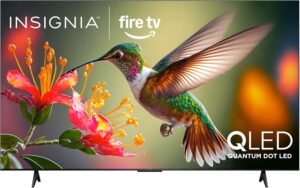
For placement, I’d use Movie/Cinema mode at night, then raise brightness and switch to a Standard-style preset for daytime glare. If I want a similarly compact option with a different platform, I’ll also compare it with this 32-inch Fire TV to sanity-check value.
Check current pricing and availability at Amazon here!
Samsung 32-Inch Class QLED Q8F 4K UHD Smart TV (2025 Model) Q4 AI Processor, 100% Color Volume with Quantum Dot, AirSlim Design, Endless Free Content, Samsung Vision AI, Alexa Built-in
This image is property of Amazon.com.
AI Processing and Smart Features
How I use Q4 AI and Vision AI day to day
I rely on the Q4 AI Processor to clean up cable, older streaming, and HD sports so they look closer to 4K, with automatic picture and sound tweaks that match the content.
Samsung Vision AI adds personalization where the model supports it, so the TV can feel less generic and easier to live with.
Alexa Built-in also keeps control simple, since I can launch apps, adjust volume, and switch inputs by voice without adding another streamer.
For comparison shopping, I sometimes cross-check features on an Insignia 75 QLED Fire TV. Check current pricing and availability at Amazon here!
Samsung 32-Inch Class QLED Q8F 4K UHD Smart TV (2025 Model) Q4 AI Processor, 100% Color Volume with Quantum Dot, AirSlim Design, Endless Free Content, Samsung Vision AI, Alexa Built-in
This image is property of Amazon.com.
Free Content and Channels
Samsung bakes in a big library of no-cost viewing, so I can turn the TV on and start watching without signing up for another monthly bill. The headline benefit is access to 2,700+ free channels, including 400+ Samsung TV Plus premium channels, plus free streaming apps with no subscription required (Samsung). I treat this as my default option for casual viewing, then I add paid services only when a specific show justifies it.
How I get the most from the free lineup
A few habits keep the experience fast and organized, even with thousands of streams available:
- I pin favorite channels first, so live news, sports highlights, and kids’ picks stay one click away.
- I scan Samsung TV Plus category rows to find premium stations quickly instead of searching channel numbers.
- I use free apps for niche content, then fall back to the channel grid when I want something instantly on.
- I recheck the guide after setup changes, since channel availability can vary by location (Samsung).
- I compare similar free-TV ecosystems if I’m shopping for other rooms, like this Roku Select Series TV or an Insignia QLED Fire TV.
Check current pricing and availability at Amazon here!


Samsung 32-Inch Class QLED Q8F 4K UHD Smart TV (2025 Model) Q4 AI Processor, 100% Color Volume with Quantum Dot, AirSlim Design, Endless Free Content, Samsung Vision AI, Alexa Built-in
This image is property of Amazon.com.
Motion, Sports, and Gaming (Important Caveat)
I like Samsung QLED sets for clean motion and punchy color, but I keep expectations grounded on this specific size. The 32-inch Q8F uses Motion Xcelerator 120Hz processing, while the listed native refresh rate is 60 Hz. That combo still delivers smooth-enough sports and responsive casual play, yet it won’t feel like a true high-refresh panel in every scenario.
What I recommend for real-world use
A few quick setups help me get the best results without chasing specs that don’t apply to this class:
- For sports: I leave motion smoothing moderate. Cranking it can add artifacts around fast players and the ball.
- For consoles: I enable Game Mode to cut input lag. I avoid extra motion processing while gaming.
- For PC: I treat 4K 144Hz VRR claims as conditional. It depends on the connected PC and the game’s support, and this 32-inch model’s native 60 Hz cap still sets the baseline behavior.
- For alternatives: If I’m prioritizing big-screen fast gaming, I compare sets like this 144Hz gaming TV to better match that goal.
Check current pricing and availability at Amazon here!
Samsung 32-Inch Class QLED Q8F 4K UHD Smart TV (2025 Model) Q4 AI Processor, 100% Color Volume with Quantum Dot, AirSlim Design, Endless Free Content, Samsung Vision AI, Alexa Built-in
This image is property of Amazon.com.
Design, Setup, and Everyday Use
Samsung’s AirSlim styling keeps this QLED sleek and low-profile, so I can place it cleanly in a bedroom, office, or smaller living room without the screen dominating the space. Cable management stays simple, and wall mounting looks especially tidy.
Daily practicality that feels like a deal
A few habits make the experience smoother day to day:
- I run the initial setup on a stable Wi‑Fi connection to speed app sign-ins and updates.
- I dial in picture presets once, then save per-input settings for consistent viewing.
- I rely on the built-in speakers for casual TV; they sound better than I’d expect at this size, though a soundbar still wins for movies.
For shoppers comparing alternatives, I also keep options like the Insignia 75″ QLED 4K Fire TV with Alexa Remote in mind on price.
Check current pricing and availability at Amazon here!
Samsung 32-Inch Class QLED Q8F 4K UHD Smart TV (2025 Model) Q4 AI Processor, 100% Color Volume with Quantum Dot, AirSlim Design, Endless Free Content, Samsung Vision AI, Alexa Built-in
This image is property of Amazon.com.
Reliability and Remote Feedback (Mixed)
Real-world reliability feedback lands in the middle. I see plenty of owners reporting stable performance after setup and daily use, yet a small group reports early failures around the 6‑week mark. That pattern usually points to unit variance, shipping damage, or a bad batch rather than a universal flaw. I treat it like any value TV purchase: I keep the box for the return window, I run a quick burn-in period, and I test every input and app early so problems surface fast.
How I’d de-risk ownership (and deal with the remote)
A few practical moves help me separate a good unit from a problem one, and make the remote less annoying:
- I stress-test in week one: 4K streaming, HDMI handshakes, Wi‑Fi stability, and audio output changes.
- I update firmware immediately, then power-cycle once to lock in settings.
- I confirm CEC behavior with my soundbar or console so the remote doesn’t feel “random.”
- If the remote interface bugs me, I switch to a streamer I already like; for reference, I’ve compared this approach to options like the Roku Select Series.
- I document quirks with photos or video to speed up support or returns.
Check current pricing and availability at Amazon here!
Samsung 32-Inch Class QLED Q8F 4K UHD Smart TV (2025 Model) Q4 AI Processor, 100% Color Volume with Quantum Dot, AirSlim Design, Endless Free Content, Samsung Vision AI, Alexa Built-in
This image is property of Amazon.com.
Disclosure: As an Amazon Associate, I earn from qualifying purchases.

From San Jose, California. Former IT support lead who has seen unspeakable things plugged into USB ports. Reviews electronics with zero patience for bad firmware.