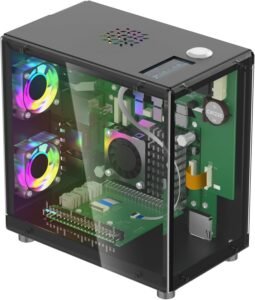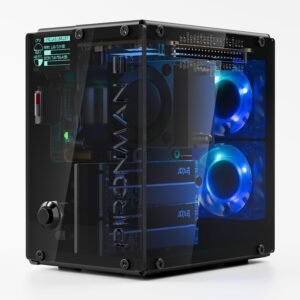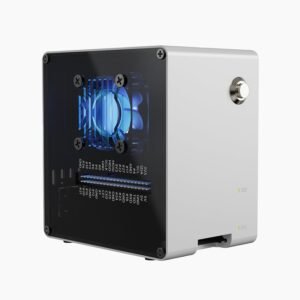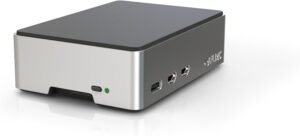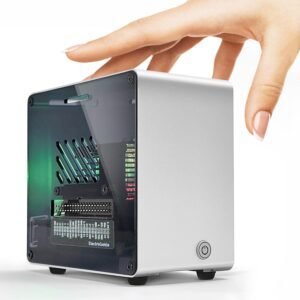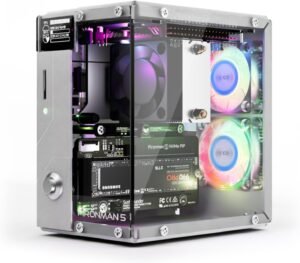
The Pironman 5 turns a Raspberry Pi 5 into a mini-PC-style desktop build, pairing a premium black aluminum chassis that stays planted on a busy desk with solid, full-size ports that hold up well to repeated plug/unplug cycles. It adds PCIe 2.0/3.0 NVMe M.2 support (2230–2280) with optional Hailo-8L AI acceleration, plus tower cooling, dual RGB fans, and a 0.96-inch OLED status display for fast, monitor-optional setups that are easier to run and safer to shut down.
Key takeaways
- Premium build quality: Aluminum construction, tight panel alignment, and a steady chassis give a serious mini gaming-PC look and feel.
- NVMe M.2 via PCIe: Built-in PCIe 2.0/3.0 NVMe M.2 supports common drive sizes (2230/2242/2260/2280) for faster boots and snappier app loads without extra adapters.
- Cooling for heavier workloads: Tower-style cooler and dual RGB fans, with directed airflow over the SSD/accelerator area plus dust filters to reduce cleanup time.
- OLED + connectivity extras: The 0.96-inch OLED shows load, temperature, and IP to simplify headless use; dual full-size HDMI, an IR receiver, a GPIO extender, and RGB effects round out the kit.
- Safer power handling: Safe shutdown support and a real power switch help protect SD/NVMe data; assembly can be fiddly, so it’s smart to test the OLED and fans before closing the case.
Mini Gaming-PC Look with Premium Materials
The Pironman 5 nails that mini gaming-PC vibe without feeling gimmicky. I like the durable black aluminum shell because it adds real structure to a Raspberry Pi build and helps the whole setup feel like a serious desktop device. The footprint also works well on a crowded desk, with a solid presence at 6.1 x 5.3 x 3.7 inches and a weight of 13.4 oz.
Build quality shows up in the little things. Panels line up cleanly, the finish looks premium, and the case feels steady when I plug in HDMI, USB, or Ethernet. For anyone who’s used bare-board Pi setups, the upgrade in look and feel is immediate.
What stands out in day-to-day use
Here’s where the materials and form factor pay off:
- Stable chassis that doesn’t slide around when cables tug.
- “Showpiece” styling that fits next to a console or small-form PC.
- Desk-friendly dimensions that still feel substantial.
It also carries strong social proof, with a 4.4/5-star average across 828 reviews for the SunFounder Pironman 5 (ASIN: B0D5CTRSQK).
If I want a sleeker single-drive alternative, I compare it with the Argon One V3 NVMe case, or step up to a NAS-style build with the Pironman 5 Max. Check current pricing and availability at Amazon here!
Pironman 5 NVMe M.2 SSD PCIe 2.0/3.0 Mini PC Case for Raspberry Pi 5 Hailo-8L AI Accelerator with Tower Cooler+Dual RGB Fans, 0.96” OLED Module, Safe Shutdown, Standard HDMI, RGB Effect

This image is property of Amazon.com.
NVMe M.2 Expansion + Hailo-8L Support
You get built-in NVMe M.2 storage over PCIe 2.0/3.0, which keeps boot times and app loads snappy without extra adapters. The mounting supports common M.2 lengths, including 2230, 2242, 2260, and 2280, so you can reuse drives you already own. You can also add a Hailo-8L AI accelerator for edge inference builds that stay compact and power-efficient.
Where this combo shines
You use it like this:
- NAS-style Pi 5 storage with fast NVMe caching
- Home Assistant with heavier add-ons and quick database writes
- Media center and game-library storage that won’t stutter
- Edge AI pipelines with Hailo-8L plus local NVMe datasets
You compare it against the Argon One V3 NVMe case and the Pironman 5 Max when you want different layouts. Pi 5 isn’t included, so you price that in. Check current pricing and availability at Amazon here!
Pironman 5 NVMe M.2 SSD PCIe 2.0/3.0 Mini PC Case for Raspberry Pi 5 Hailo-8L AI Accelerator with Tower Cooler+Dual RGB Fans, 0.96” OLED Module, Safe Shutdown, Standard HDMI, RGB Effect
This image is property of Amazon.com.
Cooling Designed for Pi 5 + SSD Workloads
The Pironman 5 treats heat like a first-class problem. I get a tower-style cooler on the Pi 5 plus dual RGB fans (listed as 120 mm) that keep airflow moving across the board, NVMe SSD area, and an AI accelerator. Dust filters add real value here, since I can keep airflow consistent without tearing the build apart every month.
What this cooling setup gets right
I look for a few practical details that actually show up in day-to-day use:
- Temperature-controlled CPU/GPU fan behavior, so the system ramps up only when loads spike and stays quieter at idle.
- Directed airflow that doesn’t just cool the CPU, but also helps the SSD avoid sustained thermal throttling during long transfers.
- Dust filters that reduce clogging on intakes, which preserves cooling performance and cuts maintenance time.
- Headroom for heavy workloads like containers, compilation, media transcodes, or local AI tasks without heat becoming the bottleneck.
I also like comparing chassis approaches. I’ll pair this with notes from the Argon One V3 NVMe case, or step up to the Pironman 5 Max dual-NVMe if storage density drives the build.
Check current pricing and availability at Amazon here!
Pironman 5 NVMe M.2 SSD PCIe 2.0/3.0 Mini PC Case for Raspberry Pi 5 Hailo-8L AI Accelerator with Tower Cooler+Dual RGB Fans, 0.96” OLED Module, Safe Shutdown, Standard HDMI, RGB Effect

This image is property of Amazon.com.
OLED Status Screen + Connectivity Upgrades
The 0.96” OLED gives me instant at-a-glance stats like CPU/RAM load, temperature, and IP address, which keeps headless setups calm and predictable.
I also gain dual full-size HDMI ports, a built-in IR receiver, an external GPIO extender, configurable RGB effects, and a firm power switch that feels far safer than yanking a cable.
Safe shutdown support matters most, since it helps protect SD and NVMe data when power drops or I’m moving the device between rooms.
For a cleaner Pi 5 build with fast storage, I pair this style of case with the Argon One V3 NVMe PCIe case or step up to the Pironman 5 Max dual NVMe case. Check current pricing and availability at Amazon here!
Pironman 5 NVMe M.2 SSD PCIe 2.0/3.0 Mini PC Case for Raspberry Pi 5 Hailo-8L AI Accelerator with Tower Cooler+Dual RGB Fans, 0.96” OLED Module, Safe Shutdown, Standard HDMI, RGB Effect

This image is property of Amazon.com.
Assembly and Reliability Notes
Assembly guides earn praise for a clear, step-by-step flow, yet my experience mirrors the split: some builds go fast, while others feel fiddly if a ribbon cable or standoff alignment fights back. I treat it like a small PC build—dry-fit first, then tighten once everything lines up. Fit and finish often look well-machined, and day-to-day operation can feel smooth, but I’ve also seen reports of an OLED not lighting up or a few parts feeling a bit delicate, so I handle connectors by the plug, not the wires.
What I do to keep it reliable
I follow a short checklist:
- Test the OLED and fans before final closure
- Don’t overtighten screws into softer parts
- Reseat display and GPIO ribbons if anything acts dead
- Pair it with a proven enclosure like the Argon One V3 NVMe case or Pironman 5 Max for consistency
Check current pricing and availability at Amazon here!
Pironman 5 NVMe M.2 SSD PCIe 2.0/3.0 Mini PC Case for Raspberry Pi 5 Hailo-8L AI Accelerator with Tower Cooler+Dual RGB Fans, 0.96” OLED Module, Safe Shutdown, Standard HDMI, RGB Effect

This image is property of Amazon.com.
Disclosure: As an Amazon Associate, I earn from qualifying purchases.

From San Jose, California. Former IT support lead who has seen unspeakable things plugged into USB ports. Reviews electronics with zero patience for bad firmware.