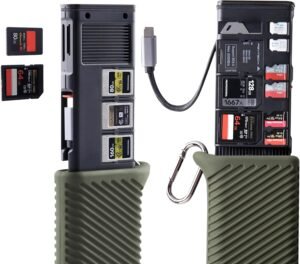
The PGYTECH CreateMate USB 3.2 CFexpress A/B Card Reader (CFexpress-A, Green) is built for fast-paced photo and hybrid shoots by combining a 10Gbps USB 3.2 Gen2 card reader with an integrated card case, letting you offload and store media in one pocketable unit for travel and location moves.
Key takeaways
- 2-in-1 design: Combines an ultra-high-speed reader with a compact card case to cut kit clutter and reduce ingest errors (clear separation of shot vs. blank cards).
- USB 3.2 Gen2 (up to 10Gbps): Real-world transfer speed still depends on card limits, the host port, cables, thermal behavior, and your file-size mix.
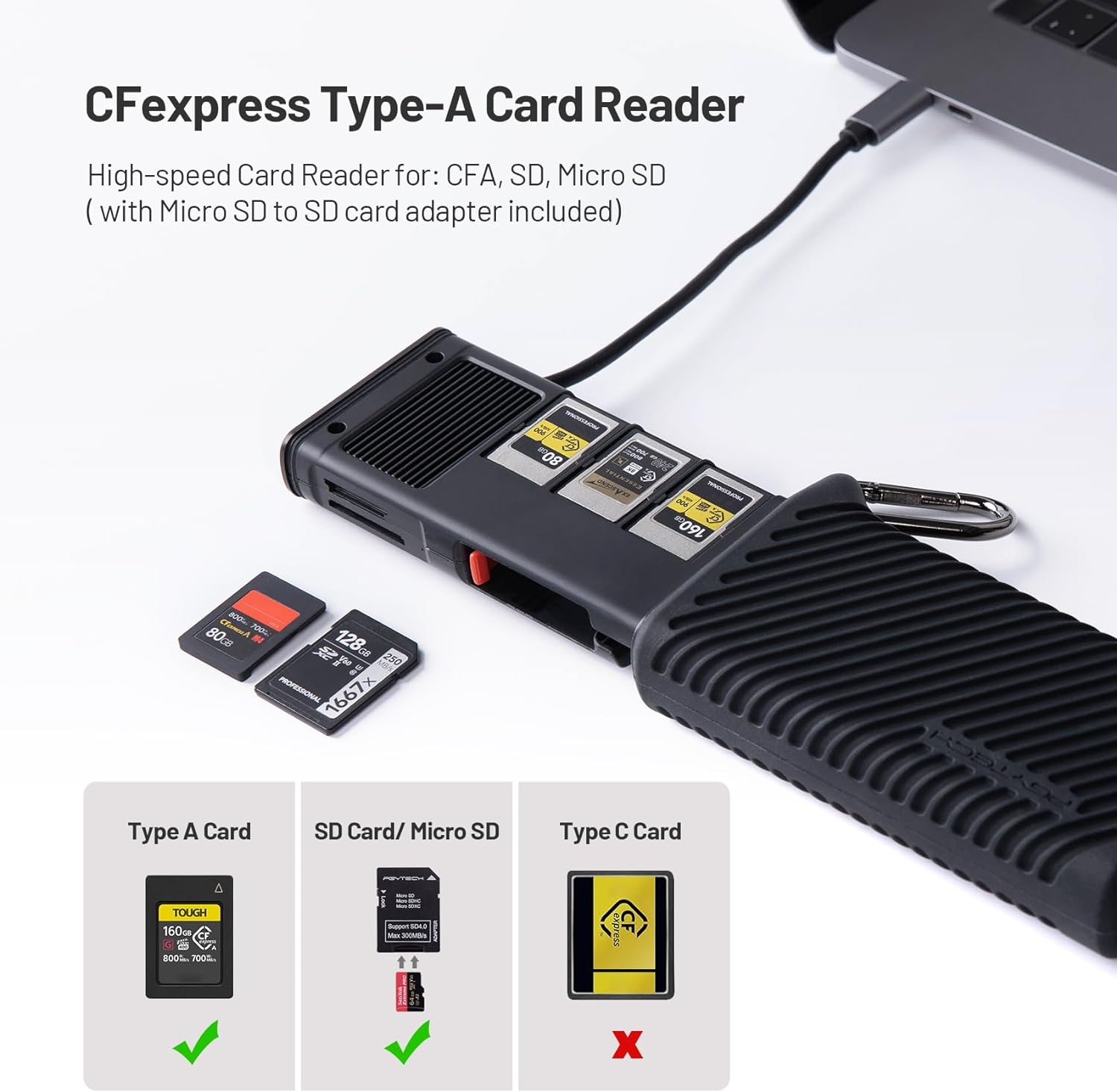
- Broad slot support: Supports CFexpress Type A and Type B, plus SD and microSD (SDXC/SDHC, microSDXC/microSDHC), with UHS-II support and UHS-I compatibility.
- Integrated storage capacity: Holds 3 CFexpress-A or 2 CFexpress-B, plus 3 SD and 4 microSD cards; also includes Nano SIM slots and an eject pin for travel convenience.
- Important limitation: You can’t read multiple slots at once. The reader prioritizes CFexpress, and you only get SD/microSD access after CFexpress.
Performance expectations (what the numbers mean)
It’s positioned for large RAW bursts and long video clips, with claimed speeds up to 1000MB/s on CFexpress and 312MB/s on UHS-II SD. In practice, you’ll see results shaped by your specific CFexpress/SD card model, whether your computer port is truly USB 3.2 Gen2, the quality/length of the cable, and sustained-transfer factors like heat and lots of small files.
Workflow fit
If you’re moving between sets, locations, or traveling, the integrated case helps keep media organized and protected, while the fast interface supports quick turnaround on dumps—just plan around the single-active-slot behavior when you’re juggling CFexpress and SD/microSD in the same ingest session.
2-in-1 Card Reader + Card Case Design
Why I like this combo in real shoots
I like the PGYTECH CreateMate because it merges an ultra-high-speed card reader with a compact card case, so I carry one small piece instead of two. That matters when I’m dumping files quickly, then stashing cards safely without digging through pouches. The built-in case also helps me keep shot and blank cards separated, which reduces mistakes during fast-paced days.
Here’s how I put the 2-in-1 layout to work:
- I offload a card, then store it immediately in the same unit.
- I keep the reader protected when it’s bouncing around a backpack.
- I simplify my kit, similar to how I streamline power with an high-output power bank.
Check current pricing and availability at Amazon here!
PGYTECH CreateMate USB 3.2 CFexpress A/B Card Reader 10GBps SD Card Reader for Photographer (CFexpress-A, Green)
This image is property of Amazon.com.
Transfer Speeds and Real-World Use
I like that this reader leans on USB 3.2 Gen2 bandwidth (up to 10Gbps), because it keeps the connection from becoming the bottleneck once I start moving big RAW bursts or long video clips. The claimed ceilings look strong too: up to 1000MB/s for CFexpress and up to 312MB/s for SD 4.0/UHS-II. That range covers most workflows I run into on photo and hybrid shoots.
What those numbers mean in practice
In day-to-day dumps, I notice the fast feeling most when I’m clearing cards repeatedly between locations. I treat the headline speeds as best-case, then plan around these real factors:
- Card capability sets the pace first. A slower CFexpress or UHS-II card won’t hit the reader’s claims.
- My port matters. I plug into a true USB 3.2 Gen2 (or Thunderbolt via USB-C) port to avoid silent fallback speeds.
- File patterns change throughput. Many small files copy slower than a few large clips.
- The included microSD-to-SD adapter (rated up to 300MB/s) helps keep drone and action-cam offloads snappy.
I pair it with a fast workstation setup and consider it a great end of shoot tool for quickly dumping photo/video files before I start culling and backups. Check current pricing and availability at Amazon here!
PGYTECH CreateMate USB 3.2 CFexpress A/B Card Reader 10GBps SD Card Reader for Photographer (CFexpress-A, Green)

This image is property of Amazon.com.
Supported Slots and Device Compatibility
What I can plug in and where it works
I like this reader because it covers the cards I actually carry, from high-bit-rate video to quick social uploads. I also get wide OS support, so I can move from desktop to tablet without changing my workflow.
Here’s what it supports in practice:
- Slots: CFexpress Type A, CFexpress Type B, SD, and microSD.
- Card standards: SDXC/SDHC and microSDXC/microSDHC.
- Speed tiers: UHS-II support, plus backward compatibility with UHS-I and non-UHS cards.
- Devices/OS: Windows 7+, Mac OS 10.6+, Linux, Android, and iPadOS.
- Field pairing tip: I’ll often recharge alongside an high-output power bank for longer dump sessions.
Check current pricing and availability at Amazon here!
PGYTECH CreateMate USB 3.2 CFexpress A/B Card Reader 10GBps SD Card Reader for Photographer (CFexpress-A, Green)

This image is property of Amazon.com.
Built-In Storage Capacity
How I use the integrated case in real shoots
This reader doubles as a pocketable card vault, so I can dump files and keep media organized without adding another case to my kit. The integrated case holds 3 CFexpress Type-A cards or 2 CFexpress Type-B cards, plus 3 SD cards and 4 microSD cards. I treat that layout like a simple on-the-go backup plan: full cards go in one side, empties stay in the other, and I always know what’s safe to format.
Here’s how I pack it for travel days and fast-turn jobs:
I load my primary CFexpress cards first, then add SD and microSD as overflow or for drones and action cams.
I use the 2 Nano SIM slots for a local data SIM and a spare, so I’m not hunting through bags at the counter.
I keep the included SIM eject pin in the case so swaps stay quick and I don’t risk bending a paperclip.
For trips, that SIM storage ends up being the sleeper feature I rely on most, since it keeps small essentials in one place alongside my media. If I’m pairing this workflow with extra power for long transfers, I’ll also throw an high-output power bank in the pouch.
Check current pricing and availability at Amazon here!
PGYTECH CreateMate USB 3.2 CFexpress A/B Card Reader 10GBps SD Card Reader for Photographer (CFexpress-A, Green)
This image is property of Amazon.com.
Build Quality and Portability
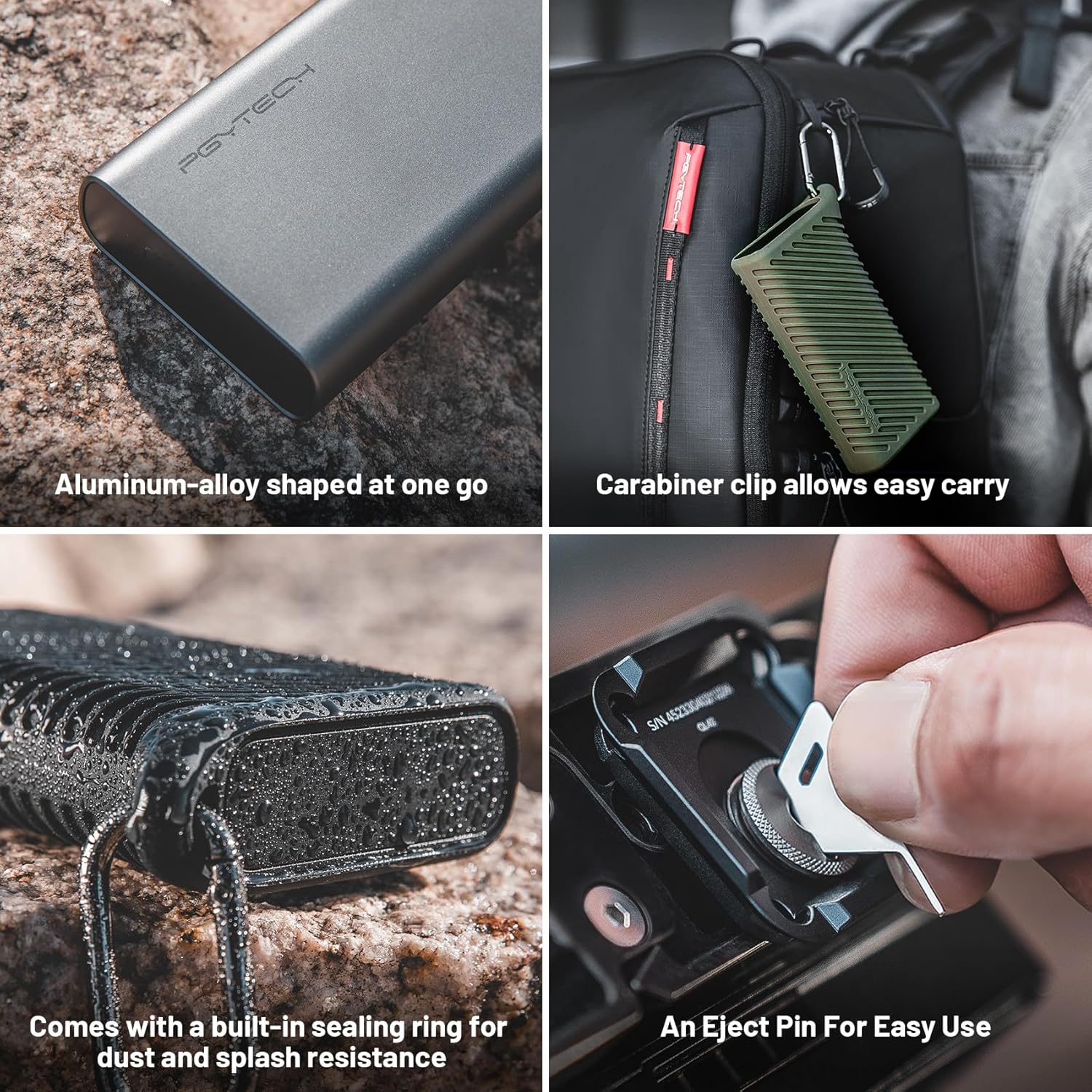
I like the aluminum alloy body here because it shrugs off bumps in a packed camera bag. I also keep the silicone protective case on full-time since it improves grip and reduces scuffs without adding bulk. A sealing ring helps with dust and splash resistance, which matters when I’m dumping cards at the trailhead or in light drizzle. The included carabiner clip makes carry simple, so I can hook it to a strap, belt loop, or pack for fast access between locations.
For a field-friendly kit, I pair it with a pocket power option like the Anker Prime power bank.
Check current pricing and availability at Amazon here!
PGYTECH CreateMate USB 3.2 CFexpress A/B Card Reader 10GBps SD Card Reader for Photographer (CFexpress-A, Green)

This image is property of Amazon.com.
Important Limitation: No Simultaneous Reading
I treat this reader as a single-lane bridge. It’ll physically accept CFexpress plus SD or microSD at the same time, but it won’t read both cards in parallel. If I insert both, the device prioritizes CFexpress first. Once the CFexpress volume mounts and finishes its initial handshake, the SD or microSD slot becomes accessible.
How I work around it in real shoots
I keep my ingest plan simple, so I don’t lose time mid-delivery. These habits prevent confusion and speed up transfers:
- I offload CFexpress first, then eject it cleanly before I touch SD/microSD.
- I label folders by card type on import (CFX_001, SD_001) so nothing mixes.
- I avoid one-card-per-app workflows during ingest, since only one slot will present at a time.
- I double-check my OS file manager to confirm which volume is actually mounted before copying.
If I need a fast SD offload between CFexpress dumps, I use a separate SD reader. For Nikon shooters building a kit, I pair this workflow with glass like the NIKKOR Z 24-70mm f/2.8 S so my capture-to-delivery chain stays efficient.
Check current pricing and availability at Amazon here!
PGYTECH CreateMate USB 3.2 CFexpress A/B Card Reader 10GBps SD Card Reader for Photographer (CFexpress-A, Green)

This image is property of Amazon.com.
Mixed User Feedback to Consider
What I’d watch for before relying on it
I see lots of reports of solid, consistent transfers, including when paired with MacBooks. That said, a smaller set of owners mention hiccups like one USB port not working, or the reader randomly stopping mid-session. I treat that as a cue to test it hard during the return window, then keep a backup workflow handy.
Here’s how I handle the common trade-offs:
- Run long copy tests on both ports as soon as it arrives.
- Use a known-good cable and avoid loose hubs if dropouts appear.
- Expect tight card retention; it’s secure, but cards can take a firm pull to remove.
Check current pricing and availability at Amazon here!
Disclosure: As an Amazon Associate, I earn from qualifying purchases.

From San Jose, California. Former IT support lead who has seen unspeakable things plugged into USB ports. Reviews electronics with zero patience for bad firmware.