MacBook Pro 14” (2025) M5 • 24GB • 1TB • Space Black
The Apple 2025 14.2-inch MacBook Pro with M5 (10-core CPU, 10-core GPU), 24GB unified memory, and a 1TB SSD is positioned as a portable pro system that maintains speed during sustained creative work—delivering fast timelines, quick exports, and smooth multitasking for video edits, large photo jobs, and app-heavy days—while pairing an HDR-grade Liquid Retina XDR display with on-device Apple Intelligence features designed to prioritize performance and privacy, all in a Space Black, travel-ready chassis with strong all-day battery life.
Key takeaways
M5 performance targets pro workflows with quick launches/exports and steady speed through long creative sessions
14.2-inch Liquid Retina XDR supports HDR work with up to 1600 nits peak, 1000 nits sustained, and 1,000,000:1 contrast
Apple Intelligence-ready with on-device AI processing that reduces cloud reliance and helps keep sensitive work more private
Portable build (3.41 lb; 12.31 x 8.71 x 0.61 in) with strong battery life for unplugged pro-app use
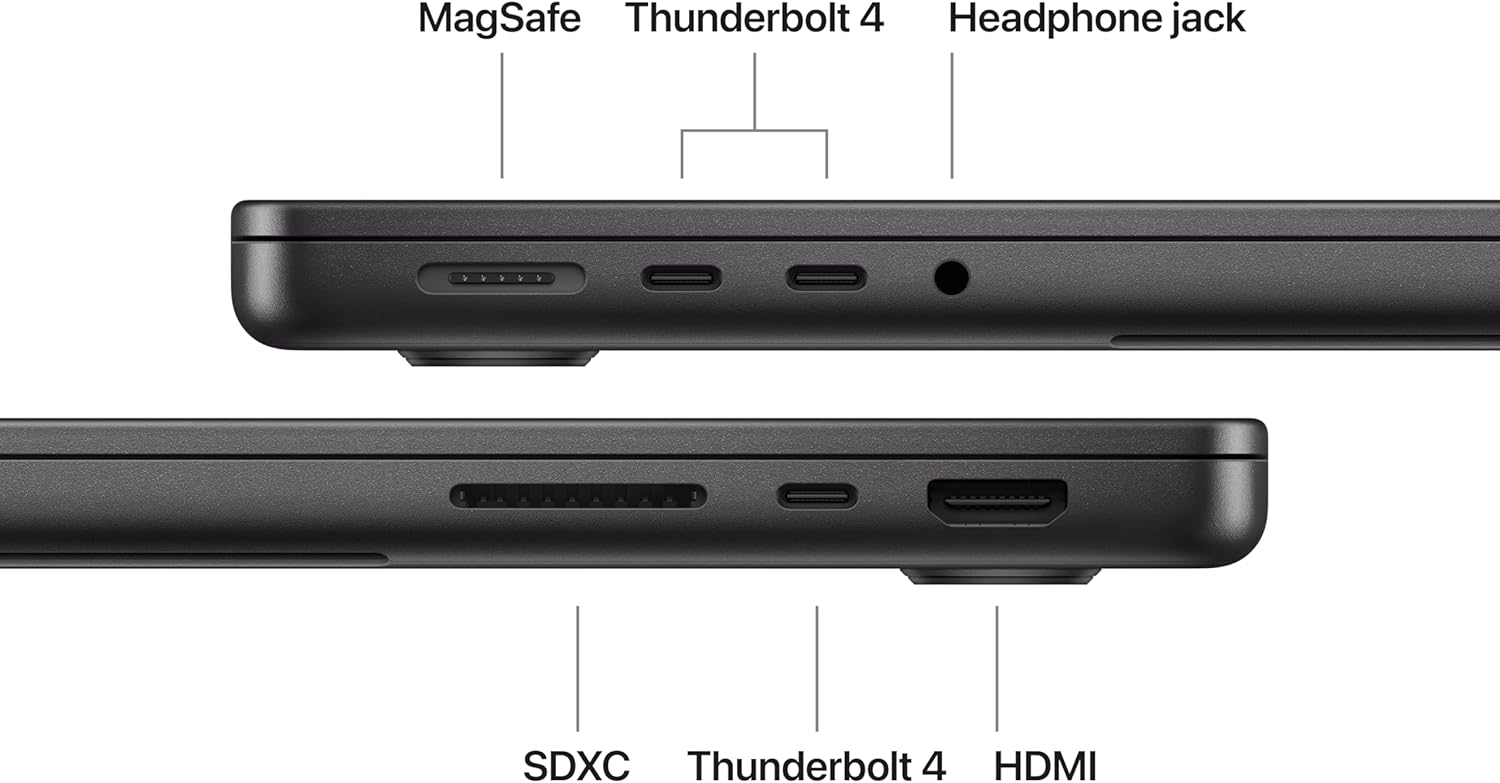
Creator-ready I/O and media: three Thunderbolt 4 ports, MagSafe 3, SDXC, HDMI, headphone jack, support for two external displays, plus a 12MP Center Stage camera and six-speaker audio with Dolby Atmos
Pro-Level Performance with M5
I treat this 14-inch MacBook Pro as a true pro machine, and the 4.7-star experience backs that up. The Apple M5 chip pairs a 10-core CPU with a 10-core GPU, so everyday work stays instant while heavy creative jobs stay smooth. I can cut video, run big photo edits, and juggle lots of apps without the system feeling strained. Consistent, flawless operation shows up again and again in user feedback, and that matches what I expect from Apple’s pro lineup.
Apple 2025 MacBook Pro Laptop with M5 chip with 10‑core CPU and 10‑core GPU: Built for Apple Intelligence, 14.2-inch Liquid Retina XDR Display, 24GB Unified Memory, 1TB SSD Storage; Space Black
This image is property of Amazon.com.
Liquid Retina XDR Display Steals the Show
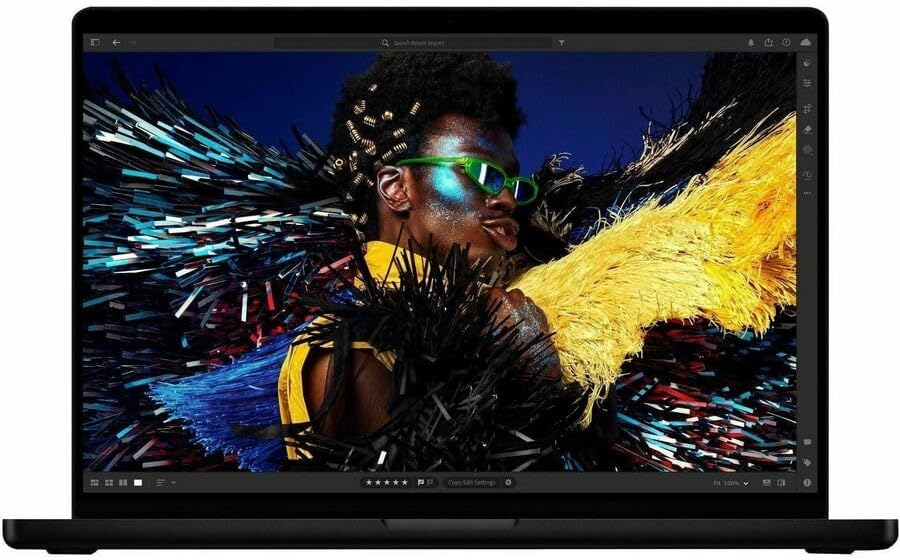
I see the 14.2-inch Liquid Retina XDR display as the MacBook Pro’s headline feature. Highlights pop without washing out, and shadow detail stays clean, which makes HDR grading and high-contrast photo work feel controlled. Apple rates it for up to 1600 nits peak brightness and up to 1000 nits sustained, backed by a 1,000,000:1 contrast ratio, so I can keep clarity in bright rooms while still getting deep, inky blacks in dark scenes.
How I get the most out of it
A few settings and habits help me keep results consistent:
I use HDR video modes only when I’m actually working in HDR.
I prefer full-screen playback to judge highlights accurately.
Apple 2025 MacBook Pro Laptop with M5 chip with 10‑core CPU and 10‑core GPU: Built for Apple Intelligence, 14.2-inch Liquid Retina XDR Display, 24GB Unified Memory, 1TB SSD Storage; Space Black
This image is property of Amazon.com.
Built for Apple Intelligence (On-Device AI + Privacy)
I run Apple Intelligence tasks right on the MacBook Pro, which keeps everyday AI fast and keeps my work off external servers. The Neural Accelerator built into each GPU core gives me responsive performance for summarizing notes, polishing writing, and generating images while I stay in my apps. I also like that on-device processing reduces network dependence, so I can keep moving even when Wi‑Fi is shaky.
Privacy-first AI I can actually use
Apple’s privacy pitch lands because it’s simple: “not even Apple can access your data.” I treat that as permission to use AI on sensitive material like client drafts and personal documents. I still keep good hygiene, but I don’t have to ship everything to the cloud to get smart features.
Here’s how I keep it practical day to day:
I use on-device AI first for drafts, summaries, and transformations, then share only final outputs.
I keep large, private working sets local, and I sync selectively.
I pair longer sessions with a dependable charger like this high-watt power bank when I’m away from outlets.
Apple 2025 MacBook Pro Laptop with M5 chip with 10‑core CPU and 10‑core GPU: Built for Apple Intelligence, 14.2-inch Liquid Retina XDR Display, 24GB Unified Memory, 1TB SSD Storage; Space Black
This image is property of Amazon.com.
All-Day Battery in a Portable Pro Design
All-day battery life matters most when I’m using pro apps away from a charger, and this MacBook Pro holds up well without forcing me to drop performance settings. I like that I can travel light and still expect consistent runtimes for writing, coding, photo work, and long video review sessions.
The portability specs hit a sweet spot for a performance laptop. At 3.41 lb with a 12.31 x 8.71 x 0.61 in footprint, it slips into a backpack easily and doesn’t feel punishing on commute days. I also appreciate the Space Black finish. It looks premium, hides fingerprints better than lighter colors, and fits cleanly in a studio or office setup.
How I get the best battery without giving up speed
I stick to a few habits that keep unplugged time strong while staying productive:
I keep screen brightness moderate and disable keyboard backlight in bright rooms.
I close heavy browser tabs and background sync tools during long work blocks.
I use Low Power Mode only for travel days, not daily editing sessions.
I pair it with a compact USB-C accessory like the high-watt power bank when outlets are uncertain.
Apple 2025 MacBook Pro Laptop with M5 chip with 10‑core CPU and 10‑core GPU: Built for Apple Intelligence, 14.2-inch Liquid Retina XDR Display, 24GB Unified Memory, 1TB SSD Storage; Space Black
This image is property of Amazon.com.
Camera and Audio for Calls, Meetings, and Media
I rely on the 12MP Center Stage camera when I’m on calls from different spots. Framing stays natural, and the extra resolution helps me look clear even when lighting isn’t perfect. For quick setup wins, I keep the camera at eye level and use a neutral front light, since it improves perceived sharpness without any extra apps or filters.
The three studio-quality microphones do a solid job picking up voice without making it sound thin. I get the best results by keeping the laptop about an arm’s length away and speaking slightly across the mic array instead of straight down into the keyboard.
Sound that fits work and play
For meetings and media, the six-speaker system brings real body to dialogue and music, and it holds up at higher volume without getting harsh. Spatial Audio and Dolby Atmos add width and separation that makes presentations, films, and live recordings feel less “laptop-like.”
Here’s how I use it day to day:
Switch to a quiet room for cleaner mic capture.
Use Spatial Audio for movies and concerts, then turn it off for voice-heavy calls.
Apple 2025 MacBook Pro Laptop with M5 chip with 10‑core CPU and 10‑core GPU: Built for Apple Intelligence, 14.2-inch Liquid Retina XDR Display, 24GB Unified Memory, 1TB SSD Storage; Space Black
This image is property of Amazon.com.
Creator-Friendly Ports and External Display Support
I like this MacBook Pro’s port mix because it keeps my workflow moving without dongle clutter. Three Thunderbolt 4 ports handle fast SSDs, docks, and capture gear, while MagSafe 3 frees up those ports and reduces accidental cable yanks during edits. An SDXC card slot lets me dump footage straight from cameras, HDMI covers quick client monitors, and the headphone jack still matters for clean monitoring and voice work. I also count on support for up to two external displays when I’m color grading and keeping timelines, bins, and messages visible at once.
Apple 2025 MacBook Pro Laptop with M5 chip with 10‑core CPU and 10‑core GPU: Built for Apple Intelligence, 14.2-inch Liquid Retina XDR Display, 24GB Unified Memory, 1TB SSD Storage; Space Black
This image is property of Amazon.com.
Price and Value: The Main Debate
I treat the MacBook Pro’s price as a commitment to performance, screen quality, and ecosystem flow. Value shows up fast if I push M5-heavy workloads for hours, grade HDR content on the XDR display, or live inside Apple features like iPhone Mirroring. Cost feels inflated if my work stays in docs, email, and light photo edits.
How I decide if it’s “worth it”
I sanity-check the purchase with a few practical filters:
I’m saving billable time with M5 speed or extra battery life.
I need accurate HDR and sustained brightness from XDR.
I benefit daily from Apple continuity features.
I’d otherwise buy add-ons, like a wireless mouse or travel power.
Disclosure: As an Amazon Associate, I earn from qualifying purchases.
Some of the links in this article are "affiliate links", a link with a special tracking code. This means if you click on an affiliate link and purchase the item, we will receive an affiliate commission.The item's price is the same whether or not there is an affiliate link. Regardless, we only recommend products or services we believe will add value to our readers.By using our affiliate links, you help support our Website, and we genuinely appreciate it.
From San Jose, California. Former IT support lead who has seen unspeakable things plugged into USB ports. Reviews electronics with zero patience for bad firmware.