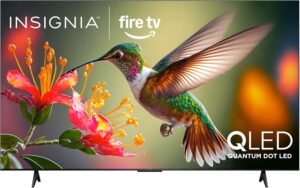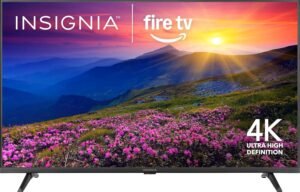
The INSIGNIA 55-inch Class F50 Series LED 4K UHD Smart Fire TV (NS-55F501NA26) is a straightforward, budget-friendly 55-inch upgrade that delivers 4K UHD with HDR10, decent upscaling for HD sources, and the convenience of Fire TV built in with an Alexa Voice Remote. The main compromise is occasional UI lag and intermittent glitches.
Key takeaways
- Display basics: 55-inch LED panel with 4K UHD (2160p) and HDR10 for brighter highlights and improved perceived depth in darker scenes.
- Upscaling: Helps older HD content look cleaner and more refined, though it’s not the same as native 4K detail.
- Smart platform: Fire TV built in reduces setup hassle and helps keep HDMI ports free while providing fast access to major streaming apps.
- Connectivity: Strong port selection, including three HDMI inputs plus HDMI eARC, optical out, USB, Ethernet, a headphone jack, and legacy AV support for older gear.
- Tradeoffs: Performance can be inconsistent (lag, glitches, occasional shutdowns). A periodic restart can help, or you can add an external streamer if you want consistently snappier menus.
Crisp, Affordable 4K Upgrade
I like the INSIGNIA 55" F50 Series 4K Fire TV (NS-55F501NA26) because it keeps the upgrade simple: a 55-inch LED panel with 4K Ultra HD (2160p) and HDR10. HDR10 gives highlights extra sparkle and helps dark scenes hold onto depth, so bright whites and deeper blacks look more convincing. I also get good mileage from its upscaling. Older HD streams and cable feeds won’t turn into true 4K, but they do look cleaner and closer to Ultra HD, especially with sharp edges and improved texture.
How I’d tune it for the best picture
I use a few quick habits to make budget 4K look premium, fast:
- I pick a Movie/Cinema-style mode for accuracy, then bump backlight for daytime viewing.
- I keep sharpness moderate to avoid halos around text and faces.
- I leave HDR on Auto so HDR10 content triggers correctly.
- I reduce motion smoothing for films to keep a natural look.
For smaller rooms, I often pair options like the Insignia 24-inch Fire TV or the Fire TV 32-inch 2-Series. If I already own a display, I jump straight to streaming upgrades like the Fire TV Stick 4K Plus, the Fire TV Cube, or the Roku Streaming Stick.
Check current pricing and availability at Amazon here!
INSIGNIA 55-inch Class F50 Series LED 4K UHD Smart Fire TV with Alexa Voice Remote (NS-55F501NA26)

This image is property of Amazon.com.
Fire TV Convenience Built In
Having Fire TV built in keeps the setup clean and fast. You can plug in power, connect to Wi‑Fi, sign into your Amazon account, and start streaming without adding an external stick or giving up an HDMI port. The home screen puts the big services front and center, so you can jump straight into Prime Video, Netflix, Disney+, Hulu, and HBO Max with minimal digging.
How I get the smoothest day-to-day experience
A few small choices make the built-in Fire TV feel quicker and easier to live with:
I connect the TV to 5 GHz Wi‑Fi when possible and keep the router in the open for steadier streams.
I pin my top apps to the first row, then remove clutter I never use.
I use Fire TV Channels, Pluto TV, and Tubi for no-cost viewing when I don’t feel like adding subscriptions (subscriptions may be required for some content).
I keep one HDMI free for a console or soundbar, since I’m not dedicating it to a streamer.
If you ever want a portability upgrade, you can pair it with a Fire TV Stick 4K Plus, step up voice control via Fire TV Cube, or compare alternatives like the Roku Streaming Stick.
Check current pricing and availability at Amazon here!
INSIGNIA 55-inch Class F50 Series LED 4K UHD Smart Fire TV with Alexa Voice Remote (NS-55F501NA26)
This image is property of Amazon.com.
Ports and Audio Flexibility
I get strong connectivity here: three HDMI inputs, plus HDMI eARC for cleaner audio pass-through to a receiver or soundbar. I also like having optical out for older gear, alongside USB, Ethernet, Wi‑Fi, coaxial, a headphone jack, and composite (AV) for legacy players.
How I’d set it up day to day
A few practical setups cover most rooms:
- I run a soundbar over eARC and keep one HDMI free for a console.
- I use Ethernet for steadier streaming, then reserve Wi‑Fi for phones.
- I pair a compact set with a hands-free Fire TV Cube if I want faster control.
DTS Virtual-X helps widen the sound, yet I still hear mixed results, so I’d plan on a soundbar via eARC.
Check current pricing and availability at Amazon here!
INSIGNIA 55-inch Class F50 Series LED 4K UHD Smart Fire TV with Alexa Voice Remote (NS-55F501NA26)

This image is property of Amazon.com.
Smart Home and Family Features
The Alexa Voice Remote keeps control fast and hands-off, so I can launch apps, search titles, and adjust volume with simple voice commands. I also treat the TV like a lightweight smart home screen, since it can show live camera feeds and help me keep tabs on the front door or nursery without grabbing my phone. I like pairing it with a hands-free Fire TV Cube in another room for consistent voice control.
Practical ways I use it
I rely on these features day to day:
- View compatible cameras live on the TV, especially during deliveries.
- Control smart lights and plugs by voice for quick routines.
- Lock down kids’ profiles with PIN-protected parental controls.
Check current pricing and availability at Amazon here!
INSIGNIA 55-inch Class F50 Series LED 4K UHD Smart Fire TV with Alexa Voice Remote (NS-55F501NA26)

This image is property of Amazon.com.
Performance Is the Main Caution
Some owners praise the value and picture quality, reflected in a 4.3 out of 5 stars rating across 6,754 reviews, but I still treat speed as the key tradeoff. I’ve seen reports of lag when switching apps or channels, occasional glitches, and even random shutdowns, so I plan for a slower UI if I’m picky about responsiveness.
How I’d plan around it
A few practical steps help set expectations:
- I keep background apps closed and restart the TV weekly.
- I use a dedicated streamer for smoother menus, like the Fire TV Cube or Roku Streaming Stick.
- I prioritize strong Wi‑Fi, or I choose the Fire TV Stick 4K Plus for Wi‑Fi 6.
Check current pricing and availability at Amazon here!
INSIGNIA 55-inch Class F50 Series LED 4K UHD Smart Fire TV with Alexa Voice Remote (NS-55F501NA26)

This image is property of Amazon.com.
Disclosure: As an Amazon Associate, I earn from qualifying purchases.

From San Jose, California. Former IT support lead who has seen unspeakable things plugged into USB ports. Reviews electronics with zero patience for bad firmware.