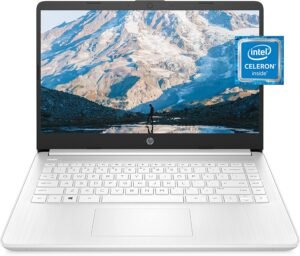
The HP 14 (14-dq0040nr) is a thin, portable budget laptop built around an Intel Celeron N4020 with Intel UHD Graphics 600, and it’s a good fit for everyday basics like email, web browsing, documents, and streaming. It also supports “4K-ready” video output to a compatible external display, which I treat as external playback/output support rather than a sign of high-end speed.
Its 14-inch micro-edge HD (1366×768) screen with a slim 6.5 mm bezel keeps the footprint compact. The tradeoff shows up in sharpness, so it’s not ideal for photo work or detailed layouts. The 4 GB RAM and 64 GB eMMC storage are the main bottlenecks. Windows 11 Home (often in S mode) tends to feel best when apps, browser tabs, and installs are kept light. The included one year of Microsoft 365 is especially helpful if you plan to stick with Word, Excel, and OneDrive instead of heavier alternatives.
Key takeaways
- Display: 14-inch micro-edge HD display prioritizes portability and a slimmer-looking footprint over high-detail visuals for creative work
- Performance: Intel Celeron N4020 + UHD 600 suits light productivity; “4K-ready” refers to external playback/output, not high-end performance
- Limitations: 4 GB RAM and 64 GB eMMC are the biggest constraints; expect slowdowns with heavy multitasking and tight storage during updates
- Windows mode: Windows 11 S mode can feel steadier and safer for first-time users, but limits apps to the Microsoft Store unless you switch out
- Extras: Lightweight (~3.24 lb) with Wi‑Fi 5, Bluetooth 4.2, and a 720p webcam, plus a 1-year Microsoft 365 subscription for added value

- READY FOR ANYWHERE – With its thin and light design, 6.5 mm micro-edge bezel display, and 79% screen-to-body ratio, you’ll take this PC anywhere while you see and do more of what you love (1)
- MORE SCREEN, MORE FUN – With virtually no bezel encircling the screen, you’ll enjoy every bit of detail on this 14-inch HD (1366 x 768) display (2)
- ALL-DAY PERFORMANCE – Tackle your busiest days with the dual-core, Intel Celeron N4020—the perfect processor for performance, power consumption, and value (3)
- 4K READY – Smoothly stream 4K content and play your favorite next-gen games with Intel UHD Graphics 600 (4) (5)
- STORAGE AND MEMORY – An embedded multimedia card provides reliable flash-based, 64 GB of storage while 4 GB of RAM expands your bandwidth and boosts your performance (6)
Display and Design
The 14-inch micro-edge HD panel (1366 x 768) keeps costs down while still feeling current. I like how the 6.5 mm bezel and 79% screen-to-body ratio make the footprint look slimmer than most budget models. Text stays readable for email, docs, and casual web use, and the 14-inch size hits a sweet spot for streaming without turning the laptop into a bulky carry.
What stands out day to day
A few details shape the experience in practical ways:
- The HD resolution works best at normal viewing distance; I’d avoid heavy photo work where fine detail matters.
- The micro-edge design helps movies and shows feel less “boxed in,” especially on a small table or tray.
- The Snowflake White finish looks clean and simple, and it pairs well with basic accessories like a compact USB-C charger or mouse.
- For value shoppers, I usually compare promos first via best laptop deals before buying.
If I plan on longer sessions, I’ll often add a comfortable mouse; ergonomic wireless mouse options can make a budget laptop feel upgraded fast.
Check current pricing and availability at Amazon here!
HP 14 Laptop, Intel Celeron N4020, 4 GB RAM, 64 GB Storage, 14-inch Micro-edge HD Display, Windows 11 Home, Thin & Portable, 4K Graphics, One Year of Microsoft 365 (14-dq0040nr, Snowflake White)
 This image is property of Amazon.com.
Processor and Graphics Performance
I run this HP budget laptop on an Intel Celeron N4020 (dual-core, up to 2.8 GHz) paired with Intel UHD Graphics 600. That combo fits light, everyday work. Email, web browsing, and documents feel fine when I keep my tabs in check. It’s also marketed as “4K ready” for streaming output, so I can push video to a compatible display, though I still expect modest frame rates and basic graphics.
How I keep it feeling responsive
A few habits make a real difference:
- I limit browser extensions and keep fewer tabs open.
- I stick to one big app at a time, especially during video calls.
- I check laptop deals if I need a step-up CPU for multitasking.
Check current pricing and availability at Amazon here!
HP 14 Laptop, Intel Celeron N4020, 4 GB RAM, 64 GB Storage, 14-inch Micro-edge HD Display, Windows 11 Home, Thin & Portable, 4K Graphics, One Year of Microsoft 365 (14-dq0040nr, Snowflake White)
 This image is property of Amazon.com.
Memory and Storage Limitations
What I can realistically do with 4 GB RAM and 64 GB eMMC
I treat 4 GB DDR4 and 64 GB eMMC as the main bottlenecks. Light work runs fine, but the system slows once I juggle lots of tabs, streams, and apps. eMMC also feels slower than an SSD, so big installs and frequent updates can crowd the drive fast. I plan around that and keep the workload simple.
Here’s how I keep it running smoothly:
- Use cloud storage and delete downloads often.
- Limit browser tabs and disable heavy extensions.
- Prefer web apps over large desktop installs.
- Add a microSD card for files and media.
- Pair it with a compact charger like this 65W USB-C charger for travel.
Check current pricing and availability at Amazon here!
HP 14 Laptop, Intel Celeron N4020, 4 GB RAM, 64 GB Storage, 14-inch Micro-edge HD Display, Windows 11 Home, Thin & Portable, 4K Graphics, One Year of Microsoft 365 (14-dq0040nr, Snowflake White)
 This image is property of Amazon.com.
Windows 11 S Mode Experience
Windows 11 in S mode keeps things clean and predictable. I like it for first-time laptop owners because it reduces risky installs and cuts down on driver and background-app chaos. Setup stays simple, updates run quietly, and the system tends to feel steady on budget hardware.
What I can do (and what I can’t)
S mode focuses on Microsoft Store apps, which shapes daily use. Here’s how I think about the trade-offs:
- Security wins: I install vetted Store apps and limit random executables, which lowers the chance of malware mistakes.
- App limits: Traditional desktop installers (.exe/.msi) won’t run, so certain tools, older printers/scanners, and niche utilities can be blocked.
- Browser and defaults: I can use approved Store browsers, but S mode strongly prefers Microsoft’s ecosystem for the smoothest results.
- Workarounds: Web apps often replace desktop tools, and I’ll keep a charger handy for long sessions; a 65W USB-C charger can help if I’m topping up on the go.
If I outgrow the restrictions, switching out of S mode is the pressure valve. I treat it as a one-way move and do it only when a must-have desktop app justifies the extra risk and maintenance.
Check current pricing and availability at Amazon here!
HP 14 Laptop, Intel Celeron N4020, 4 GB RAM, 64 GB Storage, 14-inch Micro-edge HD Display, Windows 11 Home, Thin & Portable, 4K Graphics, One Year of Microsoft 365 (14-dq0040nr, Snowflake White)
 This image is property of Amazon.com.
Battery Life and Charging
HP rates this budget HP laptop at up to 11 hours 30 minutes on a charge (HP). In my experience, real-life results swing a lot. Light work like docs, email, and a few browser tabs can feel all-day. Video calls, high brightness, lots of tabs, and background updates will cut that down fast. I also see mixed customer feedback, with some people calling the battery amazing and others reporting weak endurance or trouble holding a charge.
What I do to get steadier runtime
A few quick habits keep battery life predictable:
- I keep brightness around 40–60% and disable keyboard backlight if it’s available.
- I use Battery Saver on battery and switch to Balanced only when plugged in.
- I limit heavy browser extensions and close idle tabs.
- I update BIOS and drivers, since power management can improve over time.
HP Fast Charge helps when I need a quick top-off between classes or meetings (HP). For travel days, I pair it with a reliable USB-C charger; I keep a shortlist similar to this 65W USB-C laptop charger guide. I also track promos via best laptop deals when pricing shifts.
Check current pricing and availability at Amazon here!
HP 14 Laptop, Intel Celeron N4020, 4 GB RAM, 64 GB Storage, 14-inch Micro-edge HD Display, Windows 11 Home, Thin & Portable, 4K Graphics, One Year of Microsoft 365 (14-dq0040nr, Snowflake White)
 This image is property of Amazon.com.
Included Software Value
I count the included 1-year Microsoft 365 subscription as real savings if I’m not already paying for Office. I get Word, Excel, and PowerPoint ready on day one, which makes this HP budget pick feel like a smarter bundle versus barebones machines. I like pairing it with smart accessories and deal timing, so I’ll cross-check best laptop deals before I buy.
How I’d use it
I treat the subscription as a productivity starter kit:
- Schoolwork: essays in Word, slides in PowerPoint
- Home budgeting: Excel templates and simple charts
- Light freelance: polished docs without extra software spend
Check current pricing and availability at Amazon here!
HP 14 Laptop, Intel Celeron N4020, 4 GB RAM, 64 GB Storage, 14-inch Micro-edge HD Display, Windows 11 Home, Thin & Portable, 4K Graphics, One Year of Microsoft 365 (14-dq0040nr, Snowflake White)
 This image is property of Amazon.com.
Portability, Wireless, and Webcam
I can toss this HP budget laptop into a backpack and forget it’s there. At about 3.24 lb, it stays comfortable for commutes, school, or moving room to room. I also like that the footprint feels compact enough for tight café tables while still giving a usable keyboard and trackpad.
What I get day to day
Here’s where the basics land well for real use:
- Portability: Around 3.24 lb keeps it easy to carry without feeling flimsy.
- Wireless: Wi‑Fi 5 handles streaming, cloud docs, and typical home networks reliably.
- Bluetooth: Bluetooth 4.2 pairs fine with earbuds and mice, though it’s not the newest spec.
- Webcam: The HP True Vision 720p webcam looks fine for casual calls and quick check-ins.
I usually pair it with a compact mouse for longer sessions, and I keep an eye on best laptop deals if I’m buying for a team. For travel, I match it with a dependable 65W USB-C charger and a reliable ergonomic wireless mouse.
Check current pricing and availability at Amazon here!
HP 14 Laptop, Intel Celeron N4020, 4 GB RAM, 64 GB Storage, 14-inch Micro-edge HD Display, Windows 11 Home, Thin & Portable, 4K Graphics, One Year of Microsoft 365 (14-dq0040nr, Snowflake White)
This image is property of Amazon.com.
Overall Verdict and Best Use Case
I see this HP budget laptop as a clean-looking, low-cost pick for everyday basics. It handles web browsing, email, documents, and streaming well enough, yet performance and long-term value feedback can vary. I’d keep expectations realistic and treat it as a simple tool, not a workhorse. Pairing it with a good charger and a small upgrade plan helps it stay useful; I often point people to a 65W USB-C charger and a power bank guide for backup power.
Who it fits best
Here’s where I think it shines:
- Students who need a basic school machine
- Light home use: browsing, bills, and video calls
- Travel as a secondary laptop, especially with laptop deal tracking
Check current pricing and availability at Amazon here!
Disclosure: As an Amazon Associate, I earn from qualifying purchases.

From San Jose, California. Former IT support lead who has seen unspeakable things plugged into USB ports. Reviews electronics with zero patience for bad firmware.