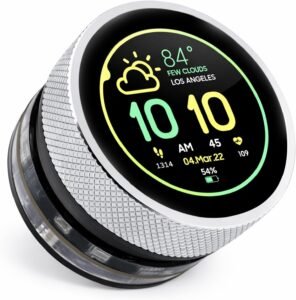
The 1.28inch ESP32-S3 Round Knob Touch Display combines a 240×240 IPS round panel, capacitive touch, and a rotary encoder (with press) so you can get fast, predictable one-handed HMI control for menus, sliders, toggles, and precision trims like PID gains or brightness. With a 240MHz dual-core ESP32-S3, integrated 2.4G WiFi, and BLE, it fits an Arduino IDE + LVGL workflow well, keeping UI rendering responsive while wireless and sensor tasks run in parallel.
Key takeaways
- Touch + rotary encoder input gives reliable interaction patterns: turn to scroll/change with acceleration, press to confirm/context, long-press to reset, and touch for direct picks and sliders.
- 1.28-inch 240×240 IPS round layout delivers crisp icons and gauge-style dashboards, suitable for dials, timers, wearables, and compact status screens.
- Dual-core ESP32-S3 performance helps keep LVGL smooth; use partial refresh, reduce overdraw, and split UI work from I/O tasks across cores.
- Integrated WiFi + BLE supports IoT panels and provisioning screens without extra radio parts, and enables simple phone pairing flows.
- Practical prototyping features include 5V power/programming and expansion options like UART, I2C, and FPC for sensors and add-ons.
Maker-Friendly HMI with Touch + Knob Control
I like this module because it pairs capacitive touch with a real rotary encoder, so my UI stays fast and predictable even when hands are wet, gloved, or busy on the bench. I map clockwise and counterclockwise turns to coarse and fine steps, then use the press action as select/back to keep menus one-handed and consistent. Touch handles direct picks, sliders, and quick toggles, while the knob covers precise trims like PID gains, brightness, or audio level.
Interaction patterns I rely on
Here are dependable mappings I implement in firmware:
- Turn: scroll lists and change values with acceleration
- Press: confirm, open context menus, or long-press for reset
- Touch: jump to pages, drag sliders, and toggle states
For enclosure inspiration, I reference the RGB OLED case layout ideas.
Check current pricing and availability at Amazon here!
1.28inch ESP32-S3 Round Knob Touch Display, 240×240 HMI IPS Rotary Display Development Board, 2.4G WiFi and BLE Capacitive Touch Screen Compatible with Arduino IDE and The LVGL Library

This image is property of Amazon.com.
Crisp 1.28-Inch IPS Round Display
I like how the 1.28-inch IPS round panel pairs compact size with a 240×240 resolution, so icons stay sharp and text stays readable without relying on tiny fonts. The round geometry also helps dashboards feel instrument-like, which works well for wearables, sensor dials, timers, and small status UIs.
Practical UI setup tips I use
To keep the interface clean on a 240×240 canvas, I stick to a few patterns that scale well:
- Use thick strokes and high contrast for needles, arcs, and icons so they don’t shimmer during motion.
- Reserve the center for the primary value, then place secondary metrics along the perimeter to match the circular layout.
- Render text at consistent sizes and avoid long labels; short abbreviations look better on a round screen.
- Precompute sprites for gauges and indicators to cut redraw time and reduce flicker in animations.
Where this form factor shines
I reach for this screen when I want a compact, polished front panel without adding mechanical complexity. For enclosure inspiration, I sometimes borrow ideas from builds like the Pironman 5 NVMe case, then scale the approach down for microcontroller projects.
Check current pricing and availability at Amazon here!
1.28inch ESP32-S3 Round Knob Touch Display, 240×240 HMI IPS Rotary Display Development Board, 2.4G WiFi and BLE Capacitive Touch Screen Compatible with Arduino IDE and The LVGL Library

This image is property of Amazon.com.
Responsive Performance for LVGL Interfaces
I count on the ESP32-S3 dual-core 32-bit CPU (up to 240MHz) to keep LVGL screens snappy while animations, touch events, and redraws run together. I keep frame drops low by limiting full-screen invalidation, using partial refresh regions, and caching icons in RAM when possible. I also split work so the UI stays smooth even as sensors or Wi‑Fi tasks run.
My LVGL tuning checklist
I use a few habits that pay off fast:
- Pin LVGL task handling to one core and background I/O to the other.
- Reduce widget overdraw and keep gradients/shadows selective.
- Prefer smaller color depth if visuals allow it.
- Batch UI updates to avoid rapid-fire redraw loops.
I’ll also reference proven enclosure ideas from an Argon One V3 case build for airflow thinking. Check current pricing and availability at Amazon here!
1.28inch ESP32-S3 Round Knob Touch Display, 240×240 HMI IPS Rotary Display Development Board, 2.4G WiFi and BLE Capacitive Touch Screen Compatible with Arduino IDE and The LVGL Library

This image is property of Amazon.com.
Wireless and Expansion for Easy Prototyping
Integrated 2.4G WiFi and BLE let me build IoT control panels, smart home dashboards, and handheld remotes without adding extra radio boards. I keep the wiring simple because 5V handles both power and programming, so I can move fast from breadboard tests to an enclosed build.
How I wire it up in real projects
A few connection patterns cover most prototypes and keep peripherals swappable:
- UART for quick console logs, GPS modules, and serial adapters when I need reliable point-to-point data.
- I2C for sensor clusters and small expanders, so I can add buttons, IMUs, or environmental sensors with just two signal lines.
- FPC expansion for slim, clean add-ons when I want a compact layout and fewer loose jumpers.
- 5V input for bench supplies or USB power, which cuts down on power headaches during firmware iteration.
For enclosed installs, I like pairing this build with clean mounting ideas borrowed from projects like the Argon One V3 case, even if the platform differs.
Check current pricing and availability at Amazon here!
1.28inch ESP32-S3 Round Knob Touch Display, 240×240 HMI IPS Rotary Display Development Board, 2.4G WiFi and BLE Capacitive Touch Screen Compatible with Arduino IDE and The LVGL Library

This image is property of Amazon.com.
Compact Size for Enclosures
I like this unit for tight builds because it stays compact and light without forcing painful layout tradeoffs. The 1.9 x 1.9 x 1.3 inch footprint fits cleanly in small project boxes, and the 1.76-ounce weight keeps mounts from flexing or rattling over time. That balance helps me keep cable runs short and airflow paths clear, especially when I stack components or add a battery.
Practical enclosure tips I use
A few build habits make the most of the small form factor:
- I place stand-offs first, then confirm the display’s depth clearance before committing to cutouts.
- I route power and data along one edge to avoid strain at the connector and reduce EMI headaches.
- I add a thin insulating sheet if the enclosure has metal walls, then ground the case at a single point.
- I mock the layout with cardboard spacers so the 1.3-inch height doesn’t collide with buttons or speakers.
For Pi-based builds where a screen becomes part of a compact stack, I also draw ideas from cases like the Pi 5 mini PC case and the Argon One V3 case.
Check current pricing and availability at Amazon here!
1.28inch ESP32-S3 Round Knob Touch Display, 240×240 HMI IPS Rotary Display Development Board, 2.4G WiFi and BLE Capacitive Touch Screen Compatible with Arduino IDE and The LVGL Library

This image is property of Amazon.com.
Polished Usability Features
Power draw matters for portable dashboards and always-on status panels, so I like that this ESP32-S3 display leans into low power behavior without sacrificing responsiveness. That makes it easier to run from small LiPo packs, USB power banks, or a modest wall adapter while keeping heat and noise down.
Ambient feedback that feels finished
I use the built-in ambient light effect as a quick state indicator layer that makes prototypes look product-ready. A few practical patterns I rely on are:
- Soft pulse for idle/standby
- Solid color for connected/healthy
- Fast blink for pairing or alerts
For enclosure inspiration around compact builds, I sometimes reference the Flirc case even when I’m prototyping off-Pi. Check current pricing and availability at Amazon here!
1.28inch ESP32-S3 Round Knob Touch Display, 240×240 HMI IPS Rotary Display Development Board, 2.4G WiFi and BLE Capacitive Touch Screen Compatible with Arduino IDE and The LVGL Library

This image is property of Amazon.com.
Ideal for Arduino IDE + LVGL Projects
I use this ESP32-S3 display as a fast path from sketch to polished UI. The 240MHz dual-core ESP32-S3 keeps LVGL screens responsive, even when I combine touch input, animations, and wireless updates. The 1.28-inch IPS panel at 240×240 looks sharp for widgets, menus, and status dashboards. Arduino IDE compatibility helps me iterate quickly in classes, workshops, and early prototypes without switching toolchains.
Practical project fit and workflows
I pick it for hands-on learning and UI practice because the inputs feel like a real product. It also makes quick demos look credible on day one. I lean on these features in my builds:
- Rotary encoder with press for scroll + select flows that match common device UIs
- Capacitive touch for direct manipulation and gesture-style controls
- 2.4G WiFi + BLE for provisioning screens, sensor dashboards, and phone pairing
- UART/I2C/FPC options to bridge sensors, expanders, and daughterboards cleanly
- 5V supply support for breadboard-friendly lab setups
For enclosure ideas, I sometimes reference compact case layouts like the Argon One V3 case to sanity-check clearances and control placement.
Check current pricing and availability at Amazon here!
1.28inch ESP32-S3 Round Knob Touch Display, 240×240 HMI IPS Rotary Display Development Board, 2.4G WiFi and BLE Capacitive Touch Screen Compatible with Arduino IDE and The LVGL Library
This image is property of Amazon.com.
Disclosure: As an Amazon Associate, I earn from qualifying purchases.

From San Jose, California. Former IT support lead who has seen unspeakable things plugged into USB ports. Reviews electronics with zero patience for bad firmware.