
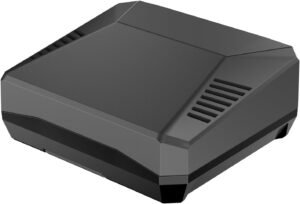
The Argon ONE V3 M.2 NVMe PCIe Case for Raspberry Pi 5 turns the Pi 5’s PCIe port into clean, internal NVMe storage, giving a setup that can feel faster and steadier than microSD for boots, databases, containers, and large-file work—backed by strong reception (4.4/5 from 188 ratings), a premium aluminum build with active cooling plus an SSD heatsink, and an important install lesson: fully seat the cable and route it cleanly to avoid intermittent NVMe detection.
Key takeaways
- PCIe-to-NVMe storage: Uses the Raspberry Pi 5 PCIe interface to deliver SSD-class NVMe performance in a tidy, internal case build (no USB storage hanging off the side).
- Drive compatibility: Supports M-Key NVMe drives up to 2280 length (2230/2242/2260/2280), but SATA M.2 drives won’t work.
- Signal integrity matters: Includes an impedance-controlled FPC cable that improves PCIe signal integrity when routed correctly and fully seated on both ends.
- Cooling is core: The aluminum enclosure acts as a heat spreader, a 30 mm fan moves air through the case, and an SSD heatsink helps curb throttling during sustained writes.
- Common risks + fixes: Most issues come from fitment and setup details (HAT clearance, cable strain, connector alignment). Some reviews mention finicky NVMe detection, which is often fixed by reseating the cable and drive, then confirming firmware and boot-order settings.
Install note to avoid intermittent NVMe detection
The most consistent “gotcha” is the PCIe/FPC connection: make sure the cable is fully inserted and latched (where applicable) on both ends, and route it with no twisting, no sharp bends, and no strain so the connector doesn’t work loose over time.
What this setup is especially good for
- Boot reliability: More consistent boots than microSD in many real-world setups.
- Write-heavy workloads: Better suited to databases, containers, logs, and sustained writes.
- Large files: Faster access and better endurance characteristics than typical microSD cards.