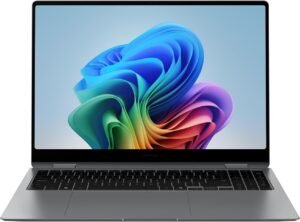
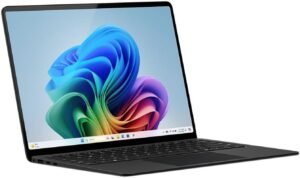
The Samsung 16” Galaxy Book5 Pro 360 (2025, NP964QHA-KG1US) reads like a flagship Copilot+ business 2‑in‑1: a big, high-refresh AMOLED canvas for productivity, a modern Intel Core Ultra platform with an on-device NPU, and a 360° hinge with S Pen support aimed at flexible work from desk to conference room.
Key takeaways (cleaned up)
Display-first productivity: The 16” 3K AMOLED touchscreen (2880×1800) at 120Hz should deliver crisp text, deep blacks, and smooth scrolling—well-suited to spreadsheets, long reading, and pen-based review/markup workflows.
Platform balance (CPU/GPU/NPU): Intel Core Ultra 7 256V with Intel Arc plus an NPU (up to 47 TOPS) targets responsive daily business work and on-device AI features. For longevity, RAM/storage configuration often matters more than peak TOPS, so it’s smart to spec enough upfront.
2‑in‑1 flexibility: The 360° hinge and included S Pen support laptop, tent, stand, and tablet modes—practical for heavy typing in laptop mode and quick annotations/presentations in stand mode.
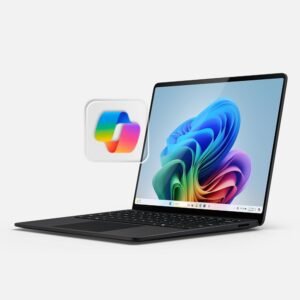
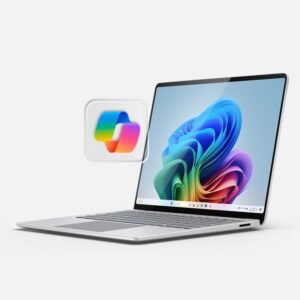
Windows 11 Pro + Copilot:Windows 11 Pro keeps it business-ready with stronger security/management options, and the dedicated Copilot key helps you use AI for drafting/summarizing faster. Treat Copilot as a first-draft accelerator, then edit for tone and accuracy.
Ecosystem + connectivity: Samsung continuity features (Multi Control, Phone Link, phone-as-webcam) plus modern I/O like Wi‑Fi 7, Bluetooth 5.4, Thunderbolt 4, and HDMI can streamline multi-device setups. Real-world battery life and overall value will vary with workload (video calls, brightness, app mix), so comparing scenarios before buying is sensible.
Overview: Premium 2-in-1 for productivity and Galaxy users
I view the Samsung Galaxy Book5 Pro 360 16” as a flagship-style 2-in-1 that puts productivity first, then adds Galaxy continuity on top. The large, high-resolution touchscreen makes spreadsheets, timelines, and split-screen work feel natural, while the 360-degree hinge lets me switch between laptop, tent, and tablet modes without breaking focus. I also like how it fits into a modern Intel platform for fast app launches and snappy multitasking, which matters when I’m juggling browsers, Office work, and creative tools.
What stands out for daily work
A few practical strengths show up quickly once I start using it:
Big canvas, touch-first flexibility: I can review decks, mark up PDFs, and present without hauling a separate tablet.
Galaxy-friendly workflow: I can keep files, notes, and messages moving across devices with less friction.
Business-ready features: I get helpful security and management options that make it easier to use for client work or a day job.
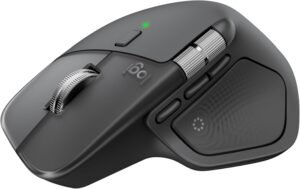
Accessory pairing: For a clean desk setup, I often match it with a good mouse like this ergonomic wireless mouse.
Samsung 16” Galaxy Book5 Pro 360 Copilot+ PC, AI Business Laptop, Windows 11 Pro, Intel Core Ultra 7 Processor 256V, 3K AMOLED Touchscreen, 16GB / 512GB, 120HZ, 2025 Model, NP964QHA-KG1US, Gray
This image is property of Amazon.com.
Display and performance highlights
The 16" 3K AMOLED touchscreen (2880 x 1800) looks crisp and punchy, and the 120Hz refresh rate keeps scrolling and pen input feeling fluid. I rely on this panel for spreadsheet work, photo review, and late-night reading because deep blacks and strong contrast make small text easier to track. For accessories that complement a premium screen-and-input setup, I sometimes pair it with a wireless mouse.
Everyday speed that stays responsive
Intel Core Ultra 7 256V (15th Gen) plus Intel Arc graphics makes day-to-day business workloads feel quick, especially in High Performance mode. I also like the dedicated NPU rated up to 47 TOPS for keeping modern AI featuressnappy without bogging down the CPU.
Samsung 16” Galaxy Book5 Pro 360 Copilot+ PC, AI Business Laptop, Windows 11 Pro, Intel Core Ultra 7 Processor 256V, 3K AMOLED Touchscreen, 16GB / 512GB, 120HZ, 2025 Model, NP964QHA-KG1US, Gray
This image is property of Amazon.com.
Design, portability, and business-ready extras
I like how this machine balances a clean, executive look with real travel practicality. At 12.7mm thin and 3.72 lbs, it slips into a briefcase without turning the commute into a workout. The CNC aluminum chassis keeps the profile slim while still feeling stiff in the hand, so I don’t worry about flex when I’m opening it one-handed in tight spaces like planes or conference rooms.
What makes it feel “office-ready” from day one
A few extras help me move faster and stay consistent across work setups:
Windows 11 Pro comes preloaded, so I can use business features immediately without an upgrade step.
A dedicated Copilot AI key puts Microsoft Copilot a single tap away, which I use for quick drafting, summarizing notes, and meeting follow-ups.
The minimalist chassis pairs well with a mobile desk setup; I often match it with an ergonomic wireless mouse and keep cables light.
Samsung 16” Galaxy Book5 Pro 360 Copilot+ PC, AI Business Laptop, Windows 11 Pro, Intel Core Ultra 7 Processor 256V, 3K AMOLED Touchscreen, 16GB / 512GB, 120HZ, 2025 Model, NP964QHA-KG1US, Gray
This image is property of Amazon.com.
S Pen and 360° flexibility for work and creation
I treat the included S Pen as the fastest way to capture ideas. Notes land cleanly, and sketches flow without me fighting the screen. Multi-touch gestures help me zoom, rotate, and correct quickly, while improved tilt sensitivity makes shading and line weight feel consistent. I’ve also seen many buyer comments saying the pen works well, which matches my day-to-day use for markups and handwritten planning.
How I use the 360° hinge in real workflows
I switch modes based on the moment, and the convertible 360° hinge keeps the device useful across different spaces. Here’s how I map each mode to practical tasks:
Laptop mode: I write, manage tabs, and type long documents with full stability.
Tent mode: I present slides in tight spaces and keep the keyboard out of the way.
Tablet mode: I annotate PDFs, whiteboard ideas, and sketch with the S Pen.
Stand mode: I run video calls or reference notes while I handwrite on-screen.
For desk pairing, I often add a pointer device like this ergonomic wireless mouse to keep editing quick.
Samsung 16” Galaxy Book5 Pro 360 Copilot+ PC, AI Business Laptop, Windows 11 Pro, Intel Core Ultra 7 Processor 256V, 3K AMOLED Touchscreen, 16GB / 512GB, 120HZ, 2025 Model, NP964QHA-KG1US, Gray
This image is property of Amazon.com.
Connectivity and Galaxy ecosystem features
I treat the Galaxy Book5 Pro 360 as a hub for Samsung devices. Multi Control stands out because I can run my Galaxy phone or tablet from the laptop’s keyboard and touchpad, then drag files across screens without breaking focus. It requires Windows 10+ and supported One UI/Android versions, so I always confirm device support before I build my workflow around it.
How I’d set up a clean daily workflow
I keep setup simple and lean on a few high-impact features:
I enable Phone Link so I can handle calls, texts, and notifications from the PC during work sessions.
I switch on the phone as webcam option for sharper video calls, then park the phone on a small stand for better framing.
I use Wi‑Fi 7 for lower latency on solid routers, while Bluetooth 5.4 handles earbuds and peripherals with fewer dropouts.
I rely on Thunderbolt 4 for a single-cable dock, then add USB 3.2 Gen 2 for fast external storage and HDMI for a dedicated monitor.
For accessories that complement a multi-device setup, I often pair it with a travel-friendly charger like this high-watt power bank.
Samsung 16” Galaxy Book5 Pro 360 Copilot+ PC, AI Business Laptop, Windows 11 Pro, Intel Core Ultra 7 Processor 256V, 3K AMOLED Touchscreen, 16GB / 512GB, 120HZ, 2025 Model, NP964QHA-KG1US, Gray
This image is property of Amazon.com.
Audio, input, and everyday usability
Sound feels big for a thin 2‑in‑1. You get quad speakers with Dolby Atmos and AKG tuning, using Big Woofer Max 5W x2 plus Tweeter 2W x2, so dialogue stays clear and bass has presence. Calls also come through clean thanks to dual microphones with AI noise canceling.
Hands-on comfort and control
Daily input wins add up, and you notice them fast:
Backlit keyboard for late work sessions.
Fingerprint reader for quick sign-in without typing passwords.
Numeric keypad for spreadsheets and finance apps.
Precise touchpad with subdivided palm rejection to cut accidental clicks.
Samsung 16” Galaxy Book5 Pro 360 Copilot+ PC, AI Business Laptop, Windows 11 Pro, Intel Core Ultra 7 Processor 256V, 3K AMOLED Touchscreen, 16GB / 512GB, 120HZ, 2025 Model, NP964QHA-KG1US, Gray
This image is property of Amazon.com.
What to consider before buying (customer feedback)
Performance comments land in a good place overall, yet a few buyers report uneven results on heavier tasks. I’d factor in a quick setup pass after unboxing, since firmware, Windows updates, and Samsung drivers can change how smooth it feels day to day.
Common themes I see in reviews
These points come up often enough that I treat them as purchase checkpoints:
Battery life varies by workload. Light browsing and docs can satisfy, while higher brightness, pen use, video calls, or creative apps can make it feel short.
Performance is mostly praised, but mixed for some. I’d match expectations to your apps, and plan to update drivers early to avoid hitchy behavior.
Value gets debated. Some customers call it pricey for 16GB RAM and a 512GB SSD, even though overall quality scores strongly at 4.4 out of 5 stars.
Upgrade flexibility matters. If storage growth is likely, I’d price your preferred external SSD or cloud plan up front.
If I expect long unplugged days, I also budget for a high-output USB-C charger or a travel battery; a compact option like this 220W power bank can help.
From San Jose, California. Former IT support lead who has seen unspeakable things plugged into USB ports. Reviews electronics with zero patience for bad firmware.
Some of the links in this article are "affiliate links", a link with a special tracking code. This means if you click on an affiliate link and purchase the item, we will receive an affiliate commission.The item's price is the same whether or not there is an affiliate link. Regardless, we only recommend products or services we believe will add value to our readers.By using our affiliate links, you help support our Website, and we genuinely appreciate it.