MacBook Pro 14” (2025) M5 • 16GB/1TB • Space Black
Apple’s 2025 14.2-inch MacBook Pro in Space Black pairs the M5 chip (10‑core CPU and 10‑core GPU) with a workflow that stays quick in daily tasks and steady under heavier loads like compiling, large file operations, and timeline-based creative work. I’m highlighting a configuration built for Apple Intelligence with 16GB unified memory and a 1TB SSD. That combo keeps on-device AI help fast while supporting privacy-first habits. A bright Liquid Retina XDR display also helps me stay accurate and comfortable in mixed or harsh lighting.
Key takeaways
M5 performance prioritizes consistent speed for multitasking, pro apps, and GPU-assisted effects, and I see less fan drama because the chip finishes work sooner
Apple Intelligence shows up as useful on-device help for writing, planning, and creative drafts, and I get lower lag plus stronger privacy than cloud-first tools
14.2-inch Liquid Retina XDR suits HDR and color-critical work with up to 1600 nits peak brightness, 1000 nits sustained, and high contrast that keeps highlights clean and shadows readable
16GB unified memory plus a 1TB SSD keeps multi-app sessions responsive, and I can store active projects locally without constant external-drive shuffling
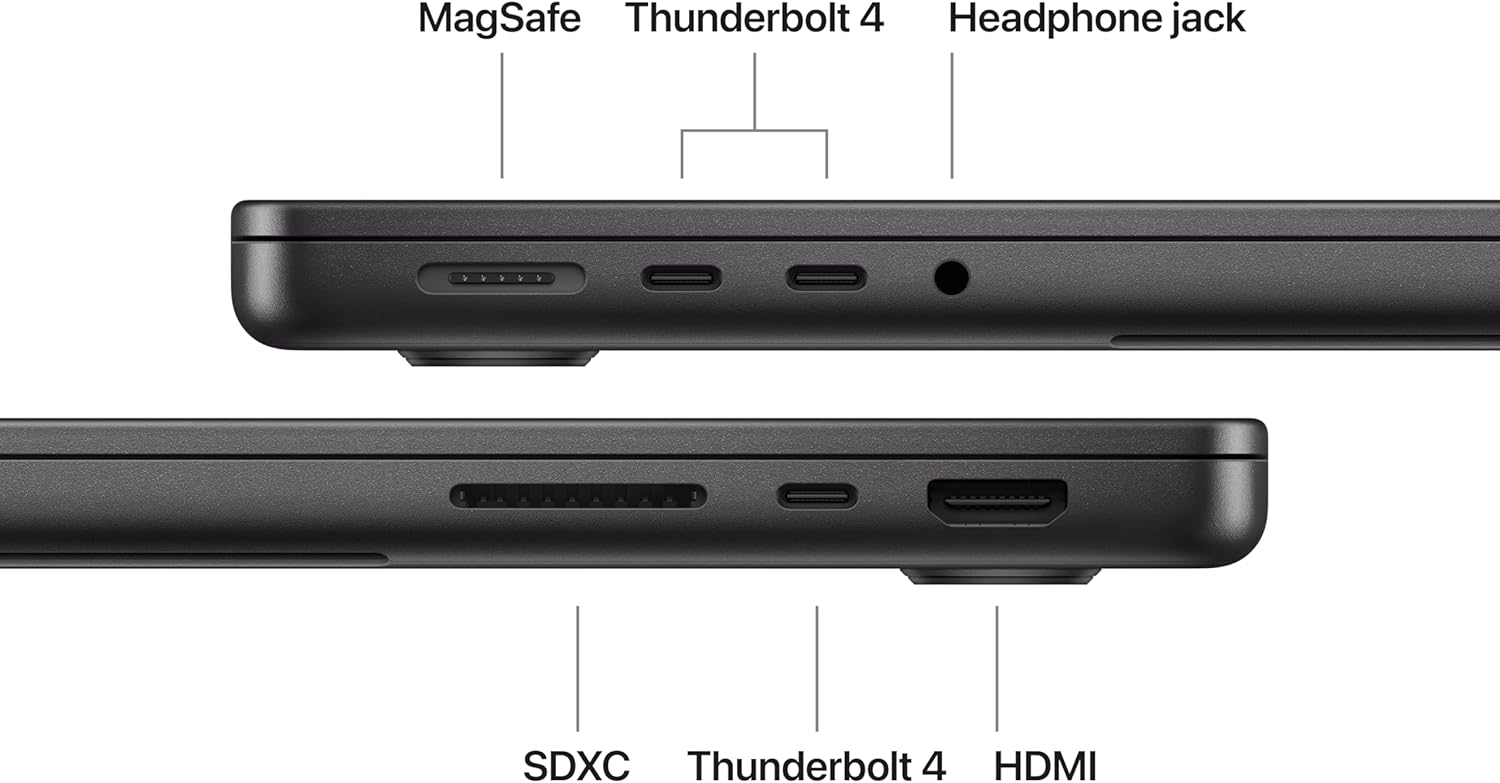
Mobility and connectivity stay strong: ~3.41 lb chassis, reliable battery performance, and a port mix (3x Thunderbolt 4, MagSafe 3, SDXC, HDMI, headphone jack) that cuts dongle use and supports up to two external displays
Overview: Fast, Bright, and Versatile
I see Apple’s 2025 14-inch MacBook Pro in Space Black as a premium pick that stays quick in everyday work and still has headroom for pro tasks. App launches feel snappy, multitasking stays smooth, and the machine keeps its composure when I stack heavy browser sessions with creative apps. That mix makes it easy to move from email and docs into photo work, coding, or timeline-based editing without changing devices.
Where it fits best in real use
I frame its versatile pitch around a few repeatable scenarios that show the value day to day:
Mobile workstation: I pair it with a higher-output charger or battery when I’m away from outlets, and I keep an eye on wattage specs using power bank fine print.
Desk setup: I treat it like a compact hub and add comfort gear, like the MX Master 4 mouse.
Travel reliability: I track bags and gear with an AirTag 4-pack.
A bright, high-quality display seals the deal for me, since it keeps content readable in mixed lighting and makes creative work feel precise.
Apple 2025 MacBook Pro Laptop with M5 chip with 10‑core CPU and 10‑core GPU: Built for Apple Intelligence, 14.2-inch Liquid Retina XDR Display, 16GB Unified Memory, 1TB SSD Storage; Space Black
This image is property of Amazon.com.
M5 Chip Performance and On-Device AI
The M5 chip gives me fast, predictable speed in daily work and real headroom in pro apps. I lean on the 10-core CPU for heavy multitasking, compiling, and large file operations, then let the 10-core GPU push through creative timelines and GPU-assisted effects without the system feeling sluggish. I also get a quieter, cooler workflow because I finish tasks faster and spend less time at sustained load.
How I put the Neural Accelerator to work
Each core includes a Neural Accelerator, so I can run AI tasks directly on the laptop for lower latency and better privacy. I keep a few habits that make the difference clear:
I batch AI-assisted edits locally, then export in fewer, larger passes to reduce repeated processing.
I prioritize apps that offer offline models so I don’t bounce between cloud and device mid-project.
I pair long AI sessions with a high-output battery option; I like keeping a guide on power bank fine print handy.
I stay productive with an ergonomic pointer; the MX Master 4 mouse fits right into this setup.
Apple 2025 MacBook Pro Laptop with M5 chip with 10‑core CPU and 10‑core GPU: Built for Apple Intelligence, 14.2-inch Liquid Retina XDR Display, 16GB Unified Memory, 1TB SSD Storage; Space Black
This image is property of Amazon.com.
Built for Apple Intelligence and Privacy
Apple Intelligence unlocks practical help across writing, planning, and creative work without turning my laptop into a data leak. I can rewrite paragraphs, summarize long notes, and generate variations fast, then keep polishing with my own voice. For creative workflows, I can move from rough concepts to draft assets quickly, then finish in my usual apps with less context switching.
How I keep data private while using smart features
I treat privacy as a setup choice, not a promise. These habits keep Apple Intelligence useful while keeping exposure low:
I review which apps can access system-wide intelligence features, then allow only what I actually use.
I keep sensitive work in local-first tools when possible, and I limit what I paste into any assistant feature.
I sign in with separate profiles for personal and work, so I don’t mix projects or histories.
I pair privacy with physical protection by tracking gear with Apple AirTag 4-pack.
I keep peripherals consistent so I don’t rely on sketchy drivers; I like the MX Master 4 for Mac.
Apple’s approach aims to keep my data inaccessible to others, including Apple, while still giving me fast on-device help.
Apple 2025 MacBook Pro Laptop with M5 chip with 10‑core CPU and 10‑core GPU: Built for Apple Intelligence, 14.2-inch Liquid Retina XDR Display, 16GB Unified Memory, 1TB SSD Storage; Space Black
This image is property of Amazon.com.
Liquid Retina XDR Display Quality
I rely on the 14.2-inch Liquid Retina XDR panel when color and highlight control matter. Apple rates it at up to 1600 nits peak brightness and up to 1000 nits sustained, plus a 1,000,000:1 contrast ratio, so HDR footage keeps specular detail without washing out when I’m working in bright rooms. Dark scenes stay clean, and UI elements remain crisp at typical editing distances.
Where it shines in daily work
I see the biggest gains in a few practical scenarios:
HDR grading: bright highlights pop while shadows hold detail.
Photo retouching: strong contrast makes edge and mask work easier.
Sunlit spaces: sustained brightness keeps timelines and scopes readable.
Apple 2025 MacBook Pro Laptop with M5 chip with 10‑core CPU and 10‑core GPU: Built for Apple Intelligence, 14.2-inch Liquid Retina XDR Display, 16GB Unified Memory, 1TB SSD Storage; Space Black
This image is property of Amazon.com.
Battery Life and Portability
I expect consistent speed whether I’m plugged in at a desk or running on battery during travel days. This laptop keeps performance steady, so long compile jobs, exports, and big browser sessions don’t feel like they’re on a timer. All-day battery life also means I can leave the charger in my bag for short trips and still work confidently from a café, a client site, or a plane.
What makes it easy to carry
A few physical details matter when I’m packing light and moving fast:
Weight stays manageable at 3.41 lb, so it doesn’t drag down a backpack during commutes.
The 12.31 x 8.71 x 0.61-inch footprint slips into tighter sleeves and small carry-ons without forcing a bag upgrade.
A thinner chassis helps on cramped trays and shared desks, where every inch of clearance counts.
If I’m pairing it with travel gear, I like to match it with a dependable USB-C mouse like the MX Master 4 for long sessions away from home.
Apple 2025 MacBook Pro Laptop with M5 chip with 10‑core CPU and 10‑core GPU: Built for Apple Intelligence, 14.2-inch Liquid Retina XDR Display, 16GB Unified Memory, 1TB SSD Storage; Space Black
This image is property of Amazon.com.
16GB Unified Memory + 1TB SSD Balance
I recommend 16GB unified memory when I want smooth multitasking without paying for headroom I won’t use. I can keep a heavy browser session open, run creative apps, and still stay responsive because CPU and GPU share the same fast memory pool.
How I put 1TB to work
I like 1TB SSD storage because I can keep active projects local and avoid constant external-drive shuffling. Here’s how I typically allocate space:
Apps and system: keep breathing room for updates and caches
Current photo/video libraries and project files
Large exports, sample libraries, and scratch space
Offline files for travel or client work
If I’m pairing it with portable power, I cross-check capacity claims using power bank fine print.
Apple 2025 MacBook Pro Laptop with M5 chip with 10‑core CPU and 10‑core GPU: Built for Apple Intelligence, 14.2-inch Liquid Retina XDR Display, 16GB Unified Memory, 1TB SSD Storage; Space Black
This image is property of Amazon.com.
Camera and Audio for Pro Calls and Media
A 12MP Center Stage camera keeps faces framed during movement, which makes calls look steady without extra software. Three studio-quality microphones capture clear speech and cut down room noise, so I can sound consistent in meetings and quick voiceovers. A six-speaker system adds real headroom for music and editing previews, while Spatial Audio and Dolby Atmos widen the soundstage for films and mixed content.
How I use these features day to day
I lean on a few practical habits to get repeatable results:
Place the laptop at eye level to reduce distortion and improve camera angles.
Mute keyboard noise by typing lightly and keeping the mic path clear.
Test Spatial Audio with reference tracks before client reviews.
I like that this MacBook Pro cuts dongle clutter with three Thunderbolt 4 ports, MagSafe 3, an SDXC card slot, HDMI, and a headphone jack. I can dump photos straight from SDXC, run wired audio without adapters, and still keep power separate via MagSafe while I use Thunderbolt for fast storage and docks.
How I put the ports to work
Here’s how I set up a clean desk and travel kit:
I plug one cable into a Thunderbolt dock for Ethernet, extra USB, and charging when I’m at a desk.
I use HDMI for quick meeting-room displays and keep Thunderbolt free for SSDs.
I pair it with a high-output battery bank; I explain the specs I look for in power bank fine print.
iPhone Mirroring turns my MacBook Pro into an extension of my phone. I can open iPhone apps on the Mac screen, reply quickly, and keep focus without picking my phone up. Cross-device copy/paste keeps my workflow fluid. I copy a code, photo caption, or address on iPhone and paste it straight into a Mac app with no extra steps.
Messages and FaceTime integration also changes how I handle communication. I take calls on the Mac, jump between threads, and share files or links right inside conversations. That flow feels especially good when I’m working with notes, screenshots, and PDFs.
Quality-of-life upgrades I rely on
Here are the ecosystem features that save me time day to day:
Universal Clipboard for quick copy/paste between iPhone and Mac.
Messages sync so every conversation stays consistent across devices.
FaceTime handoff so I can start on iPhone and continue on the Mac.
Instant photo and link sharing without emailing myself.
For a smooth travel setup, I pair this laptop with a dependable charger and a good mouse, and I keep an eye on battery accessories like those covered in how to read power bank fine print.
This model relies on integrated graphics rather than a discrete GPU. I’d treat that as a practical trade: I get excellent efficiency, quieter operation, and strong creative performance, but I won’t match a dedicated GPU for heavy 3D rendering, advanced gaming, or certain GPU-bound AI workflows. For those jobs, I plan to offload work to a desktop, cloud instance, or an external workflow where applicable.
The premium feel lines up with its 4.6-star reputation, and it shows in daily use. I notice it most in sustained pro apps, in the XDR display’s clarity and consistency, and in how the port selection reduces adapter clutter. For a quick refresher on portable power, I reference how to read power bank specs before I buy accessories.
Who this fits best
If I’m spending for “Pro,” I make sure I’ll use the key advantages:
I do photo/video, design, or dev work that benefits from the XDR display’s impact and accuracy.
I value built-in ports for monitors, fast storage, and peripherals without a hub.
I want pro-level performance that stays consistent on longer sessions.
I don’t require a discrete GPU for my primary workload.
Disclosure: As an Amazon Associate, I earn from qualifying purchases.
Some of the links in this article are "affiliate links", a link with a special tracking code. This means if you click on an affiliate link and purchase the item, we will receive an affiliate commission.The item's price is the same whether or not there is an affiliate link. Regardless, we only recommend products or services we believe will add value to our readers.By using our affiliate links, you help support our Website, and we genuinely appreciate it.
From San Jose, California. Former IT support lead who has seen unspeakable things plugged into USB ports. Reviews electronics with zero patience for bad firmware.