

The newest Amazon Echo Show 21 plays the role of a 21-inch 1080p kitchen hub. I see it replacing scattered notes with at-a-glance widgets for calendars, timers, shopping lists, weather, and reminders that stay readable from across the room. Fire TV comes built in, and Alexa+ support positions it as a single screen for streaming, whole-home audio expansion, smart-home routines, and smoother household coordination.
Key takeaways
- 21-inch Full HD display shines as a “family bulletin board.” I’d pin calendar and list widgets first, then layer in weather and rotating reminders.
- Placement matters: I’d keep the screen visible from the prep area and sink. That placement drives quick-glance habits and keeps it useful day to day.
- Fire TV built in delivers streaming and fast playback without extra boxes. I’d keep the included remote nearby for moments when my hands are messy mid-recipe.
- Smart home dashboard and one-touch routines cut phone reliance with fast tiles, group light controls, and live camera views. I’d start with 2–3 routines I’ll actually tap daily.
- Video calls and photo-frame mode add daily value. I like the centered framing features and the quick privacy controls, including a mic/camera-off button and a physical camera shutter.
Big-Screen Kitchen Hub for Family Organization
A 21″ Full-HD (1080p) Echo Show fits the kitchen role because you can read calendars, timers, shopping lists, weather, and widgets from across the room without squinting. It works like the family’s shared bulletin board, except it stays current and doesn’t get buried under paper. Customizable widgets matter here, since you can keep the home screen focused on what the household actually checks daily, instead of letting it feel like a smart speaker with extras.
How I set it up so it actually stays useful
You can keep the layout simple and set a few rules so everyone uses the same single source of truth:
You pin the calendar and list widgets first, then add weather and a rotating reminders tile.
You place it where it’s visible from the prep area and sink, since that’s where quick glances happen.
You pair it with a living-room screen for continuity, like an Amazon Fire TV 55″ 4-Series, so the same voice commands work across rooms.
You add an inexpensive secondary display for smaller spaces, such as an Insignia 24″ Fire TV.
The 4.4 star rating reflects the payoff: fewer scattered notes, less repeated asking, and one clear place to check what’s next.
Check current pricing and availability at Amazon here!


Amazon Echo Show 21 (newest model), Full HD 21″ kitchen hub for home organization, with built-in Fire TV, Designed for Alexa+
This image is property of Amazon.com.
Fire TV Built-In for All-in-One Entertainment
Fire TV built in turns the display into a single hub for streaming and quick playback. I can jump between Prime Video, Netflix, YouTube, and Apple TV, with subscriptions used where required, without juggling extra boxes. A Fire TV remote comes in handy when I’m cooking and don’t want to tap the screen with messy hands. For a similar Fire TV experience on a bigger screen, I compare it with the Fire TV 55-inch 4-Series.
Active Media for whole-home sound
Active Media stands out because I can start music in the kitchen and expand it room-by-room in seconds:
- Add the living room or bedroom on the fly for synchronized audio.
- Use it for parties, meal prep, or podcasts that follow me around.
Check current pricing and availability at Amazon here!
Amazon Echo Show 21 (newest model), Full HD 21″ kitchen hub for home organization, with built-in Fire TV, Designed for Alexa+
This image is property of Amazon.com.
Smart Home Dashboard as a Practical Control Center
I treat the smart home dashboard as my daily command screen. I can tap quick tiles or use voice to run routines without hunting through apps. A single action can flip my living room into movie mode, turning on lights, lowering brightness, and setting the right device input in seconds. I also like keeping it visible on a main screen, since it cuts friction for everyone in the house.
Fast routines and live views that reduce phone dependence
I rely on a few repeatable actions to keep things simple, and these are the ones I set up first:
- Group controls for “all living room lights” so I can change multiple bulbs at once.
- One-touch routines for morning and bedtime, triggered by voice or a single tap.
- Live camera tiles so I can glance at the front door or backyard without grabbing my phone.
- Quick access to frequently used devices, which keeps guests from getting stuck.
I get the smoothest experience when I pair the dashboard with hands-free hardware like Fire TV Cube hands-free control or add it to secondary screens such as an Insignia 24-inch Fire TV. For an easy upgrade path, I also like the Fire TV Stick 4K in rooms that already have a solid display.
Check current pricing and availability at Amazon here!
Amazon Echo Show 21 (newest model), Full HD 21″ kitchen hub for home organization, with built-in Fire TV, Designed for Alexa+
This image is property of Amazon.com.
Video Calling and Digital Photo Frame Benefits
I get real daily use out of the Echo Show 21 because it handles both connection and ambience. Video calls feel natural since the centered camera keeps faces where they belong, even when I move around the room. A wide field of view helps fit everyone in, while 3.3x zoom lets me tighten the shot without walking closer. Noise reduction also keeps conversations clear when the kitchen or living room gets busy. For a simple calling setup on any display, I often pair it with a hands-free Fire TV Cube nearby for voice control.
Photo frame mode that looks like décor
I treat the screen like a bright, always-on frame that happens to call people. A few habits make it shine:
- I let it auto-curate favorite photos so the rotation stays fresh without constant edits.
- I mix close-ups with wider shots so the display doesn’t feel repetitive across the day.
- I keep it visible from main seating so it reads like wall art, not a device.
For TVs that match the same ambient screen vibe, I like an Amazon Fire TV 55 in larger rooms.
Check current pricing and availability at Amazon here!
Amazon Echo Show 21 (newest model), Full HD 21″ kitchen hub for home organization, with built-in Fire TV, Designed for Alexa+
This image is property of Amazon.com.
Instant-Trust Privacy Controls
I like privacy controls that work fast and feel obvious. This device gives me layered options I can use without digging through menus. A dedicated mic/camera-off button cuts sensors immediately, which helps when a room shifts from movie night to private time. The built-in camera shutter adds a physical barrier I can see at a glance, so I don’t have to rely on software status icons.
How I use the layers day to day
I stick to a simple routine to keep things consistent:
- I flip the shutter closed whenever I’m not using video calls.
- I tap mic/camera-off during meetings if someone walks in.
- I pair it with a hands-free setup like the Fire TV Cube so I control playback without reopening sensors.
Check current pricing and availability at Amazon here!
Amazon Echo Show 21 (newest model), Full HD 21″ kitchen hub for home organization, with built-in Fire TV, Designed for Alexa+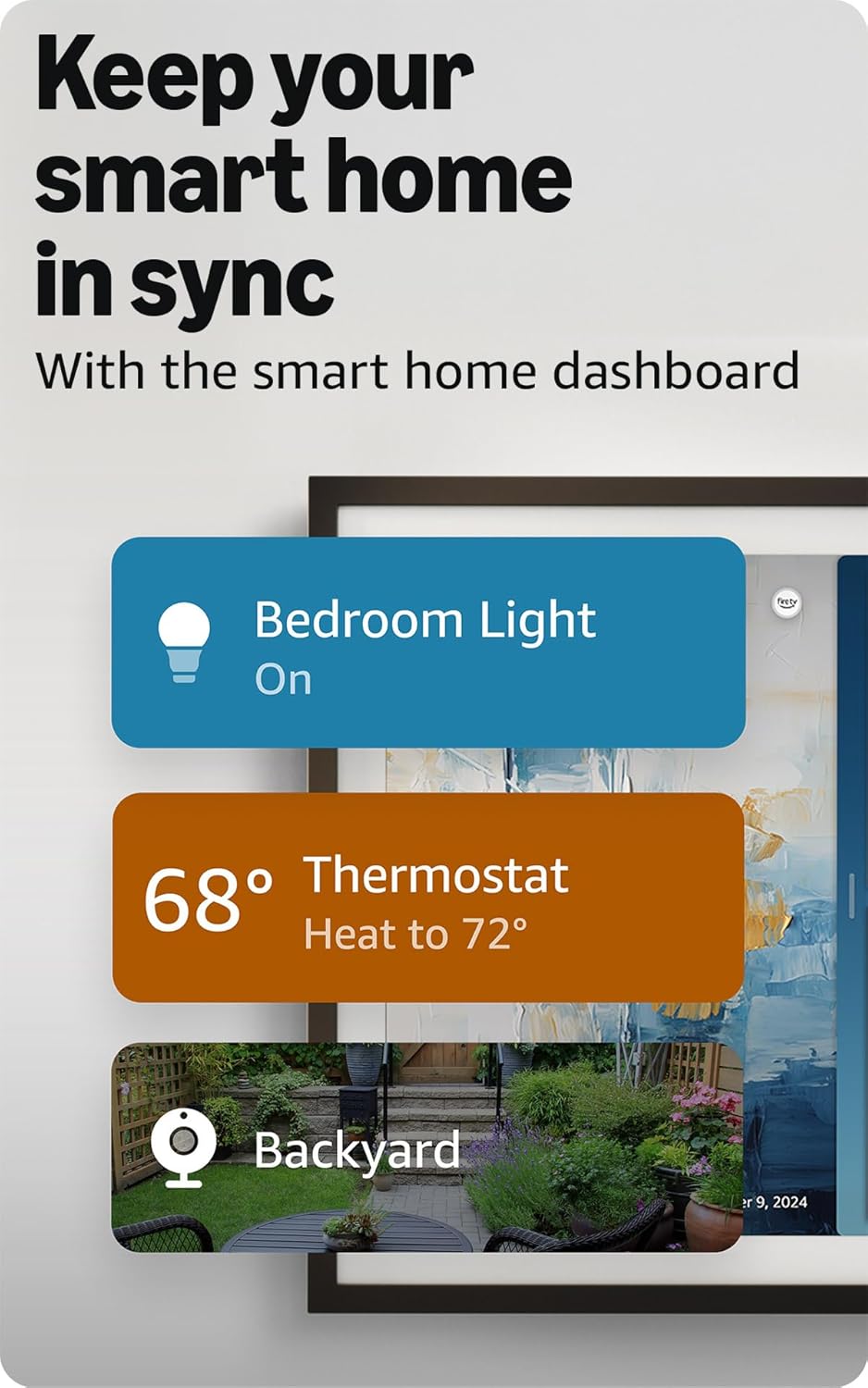
This image is property of Amazon.com.
Disclosure: As an Amazon Associate, I earn from qualifying purchases.

From San Jose, California. Former IT support lead who has seen unspeakable things plugged into USB ports. Reviews electronics with zero patience for bad firmware.




