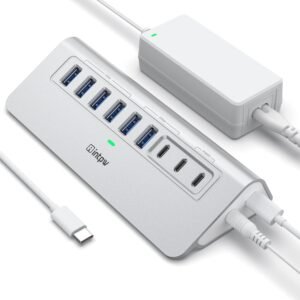
The intpw 9-Port Powered USB Hub works like a desk-ready mini dock. I treat it as a splitter that keeps the 10Gbps USB 3.2 data ports (1x USB‑C + 2x USB‑A) focused on fast storage and media work. I use the 5Gbps USB 3.0 ports for everyday peripherals. I also count on the two USB‑C PD 45W ports for charging only.
In daily use, I get the most consistent results by sticking with the included 65W power adapter. I also plug SSDs into the 10Gbps ports first and leave the PD ports for power, since they don’t handle file transfer or display output.
Key takeaways
- 9 ports total: 1x USB‑C 3.2 (10Gbps), 2x USB‑A 3.2 (10Gbps), 4x USB‑A 3.0 (5Gbps), plus 2x USB‑C PD 45W charging-only ports
- Best workflow: I plug SSDs and fast readers into the 10Gbps ports first; I reserve 5Gbps ports for keyboard, mouse, printer, mic, and dongles
- Power for stability: Use the included 65W (20V/3.25A) adapter for stability during long transfers and when connecting storage
- Manufacturer guidance: I avoid running multiple SSDs at the same time to reduce disconnects and keep throughput steady
- No video output: No monitor support (no DisplayPort Alt Mode); I use this hub for data, peripherals, and charging (including iPhone 17/16/15 and iPad)
Performance and transfer speeds
I get strong real-world throughput from this hub because it splits high-speed and standard-speed ports in a sensible way. The USB 3.2 connections cover the heavy lifting: the USB-C 3.2 port and 2x USB-A 3.2 ports support up to 10Gbps for fast moves of HD photo libraries and big video exports. For everyday peripherals, the 4x USB-A 3.0 ports run up to 5Gbps, which keeps card readers, microphones, and backup drives from feeling sluggish.
What I do to keep speeds consistent
A few setup habits make the difference between spec sheet fast and workflow fast:
- I plug external SSDs into the 10Gbps ports first, then leave the 5Gbps ports for lower-priority devices.
- I use the included 65W (20V/3.25A) power adapter whenever I attach storage. That extra headroom helps the hub stay stable during long transfers.
- I follow the manufacturer’s limitation and avoid running multiple SSD drives at the same time. One SSD at a time keeps performance steady and prevents disconnects.
If I need extra portable power for a laptop-on-the-go setup, I pair it with a dedicated battery pack like this high-output power bank.
Check current pricing and availability at Amazon here!
Powered USB Hub 10Gbps, intpw 9-Port USB 3.2 Hub, USB C Hub with USB A/USB C 3.2, 4 USB 3.0, 2 PD 45W Charging Ports, 65W Power Adapter and 3.3FT Cable, Aluminum USB Hub for Laptop, iPhone 17/16/15,PC

This image is property of Amazon.com.
Desktop-ready port selection
I treat this hub like a mini dock for daily desk setups. It gives me 9 total ports, so I don’t have to constantly swap cables when I’m moving between accessories and storage. I get 1x USB‑C 3.2 (10Gbps) and 2x USB‑A 3.2 (10Gbps) for fast SSDs and high-speed readers, plus 4x USB‑A 3.0 (5Gbps) for the steady stuff like keyboards, mice, printers, and dongles. Two USB‑C PD 45W charging-only ports keep phones, tablets, and other gear topped up without eating my data ports.
How I’d map ports at my desk
I keep things predictable so troubleshooting stays simple. Here’s how I typically assign each tier:
- 10Gbps USB‑C/USB‑A: external SSDs, fast card readers, camera offload cables.
- 5Gbps USB‑A: keyboard, mouse receiver, printer/scanner, headset dock, webcam.
- PD 45W charging-only USB‑C: phone, iPad, earbuds case, battery bank top-ups.
I like this layout most when a laptop ships with only 1–2 USB‑C ports. For a clean setup, I pair it with a single-cable accessory strategy and a reliable mouse like the MX Master 4.
Check current pricing and availability at Amazon here!
Powered USB Hub 10Gbps, intpw 9-Port USB 3.2 Hub, USB C Hub with USB A/USB C 3.2, 4 USB 3.0, 2 PD 45W Charging Ports, 65W Power Adapter and 3.3FT Cable, Aluminum USB Hub for Laptop, iPhone 17/16/15,PC

This image is property of Amazon.com.
Charging and power delivery expectations
I expect this hub to act like a small charging station once I plug in the included power adapter. Without that adapter, charging gets inconsistent and slows down fast, especially if I connect other peripherals at the same time.
Two dedicated USB-C PD ports can output up to 45W each for fast charging phones and tablets, including iPhone 17/16/15 and iPad. I treat those ports as charging-only. They won’t move files, run displays, or support other data features, so I keep my data cables on the hub’s data ports instead.
What I do in daily use
I keep things predictable by following a few rules:
- I plug the power adapter in first, then connect devices, so power negotiation stays stable.
- I use the PD ports for phones, tablets, earbuds, and handhelds, and I avoid high-draw gear.
- I don’t rely on the 45W PD ports for laptops or other high-power devices since performance can drop or charging may stall.
- I bring a quality cable rated for PD, since weak cables can cap speed even if the port supports 45W.
Check current pricing and availability at Amazon here!
Powered USB Hub 10Gbps, intpw 9-Port USB 3.2 Hub, USB C Hub with USB A/USB C 3.2, 4 USB 3.0, 2 PD 45W Charging Ports, 65W Power Adapter and 3.3FT Cable, Aluminum USB Hub for Laptop, iPhone 17/16/15,PC

This image is property of Amazon.com.
Build quality and everyday usability
I like hardware that stays put and feels solid. This hub’s one-piece aluminum body does that, and the premium silver finish looks clean next to a laptop or monitor stand. The compact footprint (2.5 x 1 x 7 inches) also helps me keep a tight desk setup without cables spilling into my workspace.
Design choices that pay off daily
The 32-degree angled triangular shape improves leverage, so I don’t have to brace the hub with my other hand every time I swap a drive or unplug an HDMI cable. Rubber feet add grip and reduce vibration, which matters when stiffer cables tug at the ports. Here’s what I notice in everyday use:
- Less desk drift when I plug and unplug frequently.
- Cleaner cable routing because the angle naturally lifts and separates connectors.
- Better durability feel versus thin plastic shells, especially for travel.
- Easier port access in tight spaces, like between a laptop stand and a monitor base.
For power-on-the-go setups, I pair hubs like this with a reliable battery bank and keep an eye on specs like PD profiles and cable ratings; I reference power bank fine print when I’m comparing options.
Check current pricing and availability at Amazon here!
Powered USB Hub 10Gbps, intpw 9-Port USB 3.2 Hub, USB C Hub with USB A/USB C 3.2, 4 USB 3.0, 2 PD 45W Charging Ports, 65W Power Adapter and 3.3FT Cable, Aluminum USB Hub for Laptop, iPhone 17/16/15,PC

This image is property of Amazon.com.
Compatibility and setup
I include a 3.3ft USB-C to USB-C cable, so setup stays simple: I plug the hub into a USB-C port on a laptop or desktop, then connect peripherals and power as needed. It works smoothly with most USB-C systems, including MacBook Air/Pro (M1–M5), iMac, Dell XPS, and Surface Pro.
I position this as a data + charging hub, so I don’t promise monitor support. Video output won’t work through this unit, even if the host port supports DisplayPort Alt Mode. If I need external displays, I pick a dedicated display hub instead and keep this one for storage, input devices, and charging.
Quick setup notes I rely on
I follow a few practical checks to avoid surprises:
- I connect the included USB-C cable first, then plug in higher-draw devices (SSDs, card readers) after the hub enumerates.
- I use a quality USB-C power source when I want stable charging; for power basics, I reference how to read power bank specs.
- I expect a friendly physical fit with 99% of standard USB-C plugs, but I avoid extra-thick custom cable housings that may feel tight.
Check current pricing and availability at Amazon here!
Powered USB Hub 10Gbps, intpw 9-Port USB 3.2 Hub, USB C Hub with USB A/USB C 3.2, 4 USB 3.0, 2 PD 45W Charging Ports, 65W Power Adapter and 3.3FT Cable, Aluminum USB Hub for Laptop, iPhone 17/16/15,PC

This image is property of Amazon.com.
Value and reassurance
I judge value by what I don’t have to buy later. A 9-port layout covers the daily essentials, and the powered design keeps peripherals stable even when I plug in power-hungry gear. I also like that the 65W adapter comes in the box, since many hubs push that cost onto me after checkout.
What makes the value feel real
A few practical points explain why the money goes further here:
- I save on accessories because the included 65W adapter handles the hub’s needs out of the gate.
- I get fewer dropouts because a powered hub can keep connected devices steadier than bus-powered options.
- I reduce desk clutter since one hub can replace several single-purpose adapters.
- I feel safer buying it because the 18-month support/replacement policy lowers the risk if something acts up.
I treat the support window as part of the value, not a footnote. If I’m building a travel kit, I pair this kind of hub with a dependable battery strategy; I keep a quick reference like power bank fine print handy so I don’t get surprised.
Check current pricing and availability at Amazon here!
Powered USB Hub 10Gbps, intpw 9-Port USB 3.2 Hub, USB C Hub with USB A/USB C 3.2, 4 USB 3.0, 2 PD 45W Charging Ports, 65W Power Adapter and 3.3FT Cable, Aluminum USB Hub for Laptop, iPhone 17/16/15,PC

This image is property of Amazon.com.
Disclosure: As an Amazon Associate, I earn from qualifying purchases.

From San Jose, California. Former IT support lead who has seen unspeakable things plugged into USB ports. Reviews electronics with zero patience for bad firmware.